ZBrushCentral

z project distorted mesh

Any solutions for the following problem:


  • Used z project for a face sculpt, tidied up the topology back in Maya and imported back to Zbrush.
  • issue- before I took it to Maya at the highest subdivision the mesh got a bit messy around the eyes and lips from the Z project, the points at the edge of the mesh, and they’ve moved too much and now I can’t move them back to the right position.(smooth doesn’t work as they are the very edge of the mesh)
Any way to salvage this with out having to go back to a much earlier save, as am very short on time.

Thanks if anyone has any solutions

Attachments
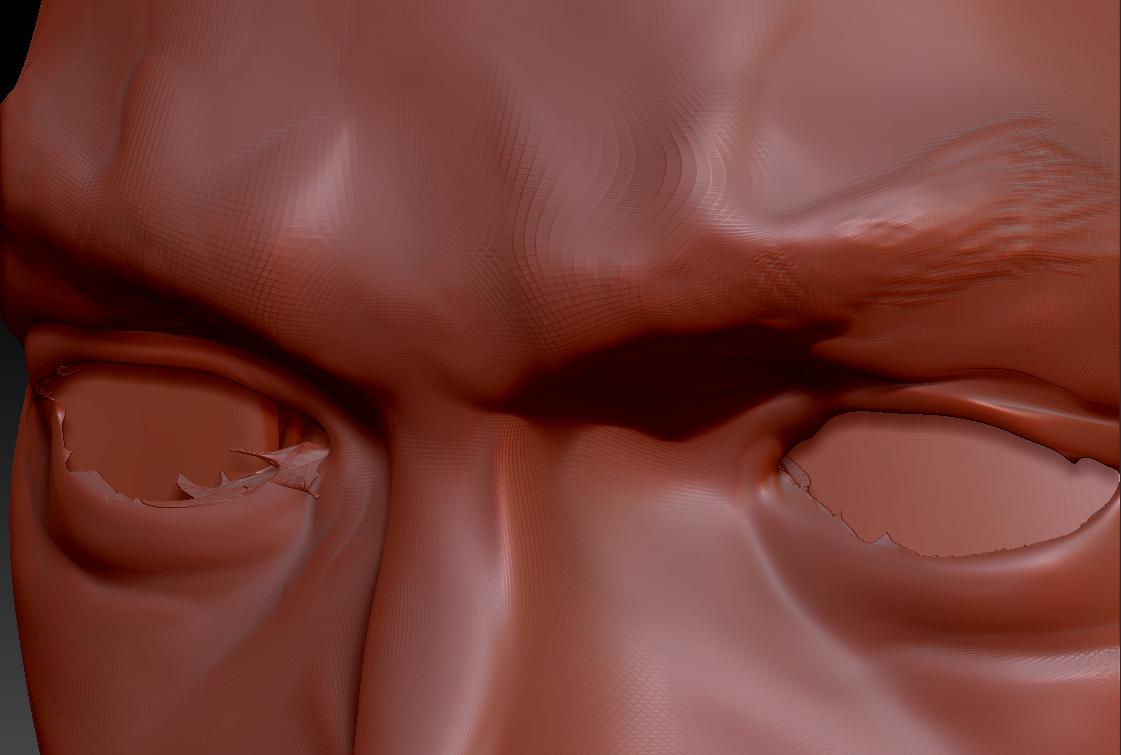
mucked up eyes.JPG

you’ll need to do another projection, but it can be done.

take your HP mesh and import your LP mesh as a subtool.
divide your LP mesh to be at or around the same number of points as your HP mesh.
store a morphtarget (tool>morphtarget>store MT
project all

look for errors in the projection…the eyes
switch your morph target back to before the projection
use the morph brush at zadd 100 to bring back the areas that are good…avoid the areas where the mesh didn’t project correctly.

now re-work those areas.

Thnks for suggestion, I got so fed up with it I took a break from it for the day but will be back on it tomorow, will let yo know if it works :slight_smile: