ZBrushCentral

Z Brush displacement map lacks detail in Modo

My Z brush displacement maps dont look very nice in Modo!

As you can see from the attachement the resultant displacement in Modo looks a little crude compared to what I painted in Z Brush
My initial thoughts were to increase the sub D level and displacement distance in Modo, which didnt help at all.
There are also some linear UV issues too

Ive seen countless Modo renders that use Z brush displacement maps and the detail looks great compared to anything Im able to achieve.

Are there any Modo/Zbrush users that can suggest anything?

Attachments
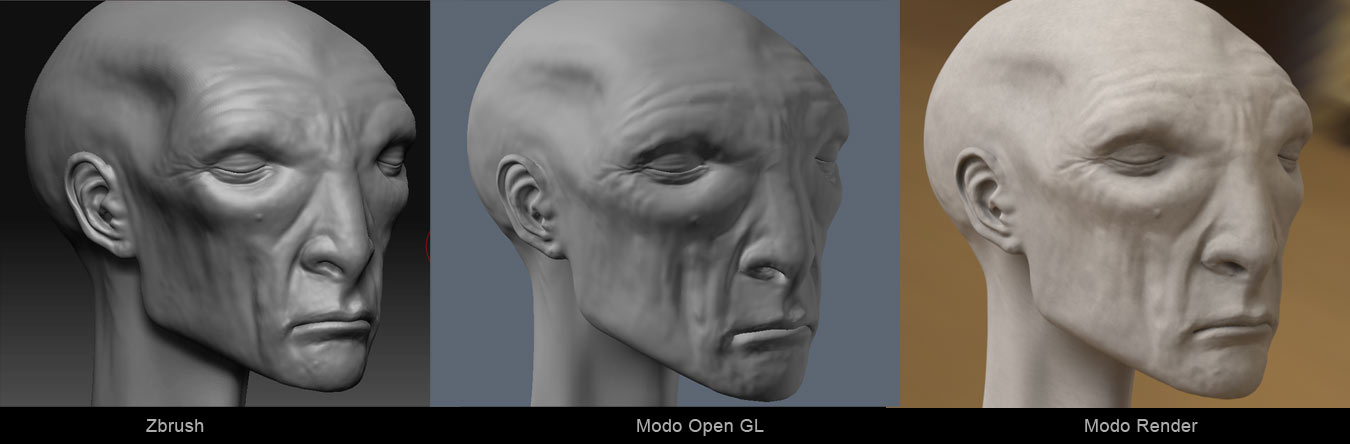
Modo-and--Zbrush.jpg

The detail doesn’t seem too bad, maybe a little off. There might be small detail, like pores, etc., that I can’t see in the snapshots. What might be causing a difference in appearance is your lighting/shading set up and material choice. For instance, your ZBrush material is shinier than the modo material, which is kind of chalky. The lights aren’t causing high contrast shadows which could bring out details. I’m just learning modo, so I can’t be of much help on tutorials. Cool model, btw.

Thanks for you kind comments on the model James…!

Yeah I havent got to the pore painting stage yet and the lighting differences dont help but there is a definite drop in quality…subtle, but enough…

Ive had some suggestions from the Modo boys so I will give them a go.

Thanks for taking the time to post anyhow!

Cheers

Matt