ZBrushCentral

Yet Another Displacement map error

Hey Guys,

Have had the damnedest trouble with this displacement map. My Maps seem to be rendering almost completely flat grey. Not as in the not visible to the eye flat grey but flat grey. I have to turn my Alpha settings in Maya to:

Alpha Gain: 500
Alpha Offset: -250

Just to get this image

BadRender.jpg

I’ve tried everything I can think of but to no avail. Any got ideas?

Cheers,
Matt

Attachments
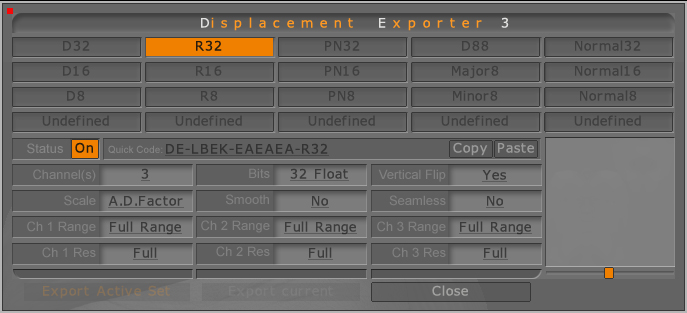
BadSettings1.jpg

BadSettings2.jpg

GoodZbrush.jpg

Somehow put this in the wrong forum without looking can someone remove it or move it to troubleshooting. Sorry.

Matt

Still no solution anyone got any ideas on this one?

Are you going to level 1 and restoring your original base mesh prior to creating the displacement map? If you’re staying at the highest level then your map will have no detail. This is because ZBrush calculates the difference between the current level and the highest level. When you’re at the highest level, there’s no difference and so the map is blank.

I had an original base level 1 but it didn’t have enough detail for me so I moved up to the third level and deleted the lower levels. I exported this to maya where I layed out the UV’s and imported this back into zbrush replacing the current non-uv’ed model. I double checked to make sure all the higher levels still worked which they do, and then moved back to the lowest level to export my Disp map. I even did a test of storing a morph target before importing the uv mesh and then restoreing it after replace but this didn’t seem to help at all either.

The answer is yes I’m exporting off the lowest level. I was also able to export a 16bit map successfully.

Thanks for any help you can give me:D

Cheers,
Matt