gys plez tell me how to export an image from zbrush without its default background …plez help me coz i want to replace the back ground with another picture
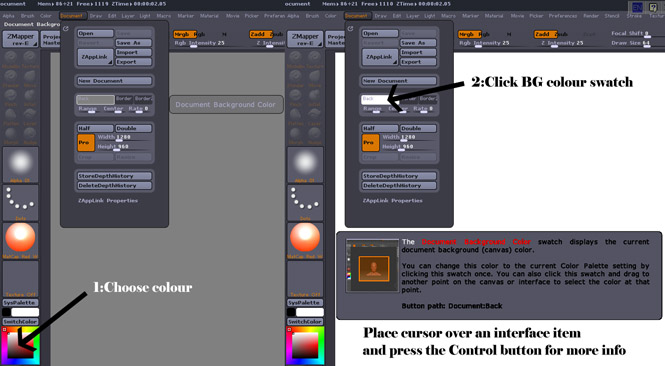
In Document, change the gradient rate to zero, then drag the background colour swatch to the current colour swatch to change it to the colour of your choice, ideally one that doesn’t exist in your image.
Cheers,
R
thanx man it’s really helpful
Another way to do things is to press Alpha>GrabDoc and export that as a PSD.
In Photoshop you can then use this alpha to create a selection mask for your render. By default, it’s a depth mask which gives some interesting compositing options such as being able to blend your figure into a background fog. But you can also use Photoshop to adjust the levels of the alpha so that it’s pure black and white and use that to cut the background out with complete accuracy.
The great thing about an alpha grab is that it reflects the exact pixels of your object. If you use a different background color, you’re stuck with the possibility that Photoshop’s Magic Wand might happen to catch a few pixels that you didn’t want, or miss a few that you did want.
thank you very much man i’ll try 
Here you go!
Attachments
thanx man really helpful small_orange_diamond:)