ZBrushCentral

Wire style (Meats Meier)

Hi,

I am a new user and just finished the Introduction to Zbrush 3 "Meats Meier" tutorial. And now i am working on the other tutorial of him for illustration. One of the lecture which by the way i am mostly interested in is about the wire styles. He uses actually the textures to create a new wired style meshes. But after he choose the object, he assign the texture on it ( 32th texture with horizontal and vertical lines) and it is done by the software instantly. It assigns the white and black pixels to define the transparent areas so with these wires using morph and Inflat deformation techniques he creates the wire looks not possible in a minute with the traditional 3D modeling approach. so I have to master this technique for illustration I could not do that... when i assign the texture nothing changed for my model in zbrush 3.2.

The steps he made :

  1. Load a 3D tool
  2. Choose a texture ( in this case 32th as u know)
  3. Invert Mask
  4. Masking / click “Int” ( From Texture Intensity )
  5. Texture Off
  6. HidePt
  7. Geometry Delete Hidden
  8. Display Double
  9. Morph Target / StoreMT
  10. Inflat (4-6 optional)

Done ( CreateDiff can be used )

What am I missing could u help me please? Meats.jpg
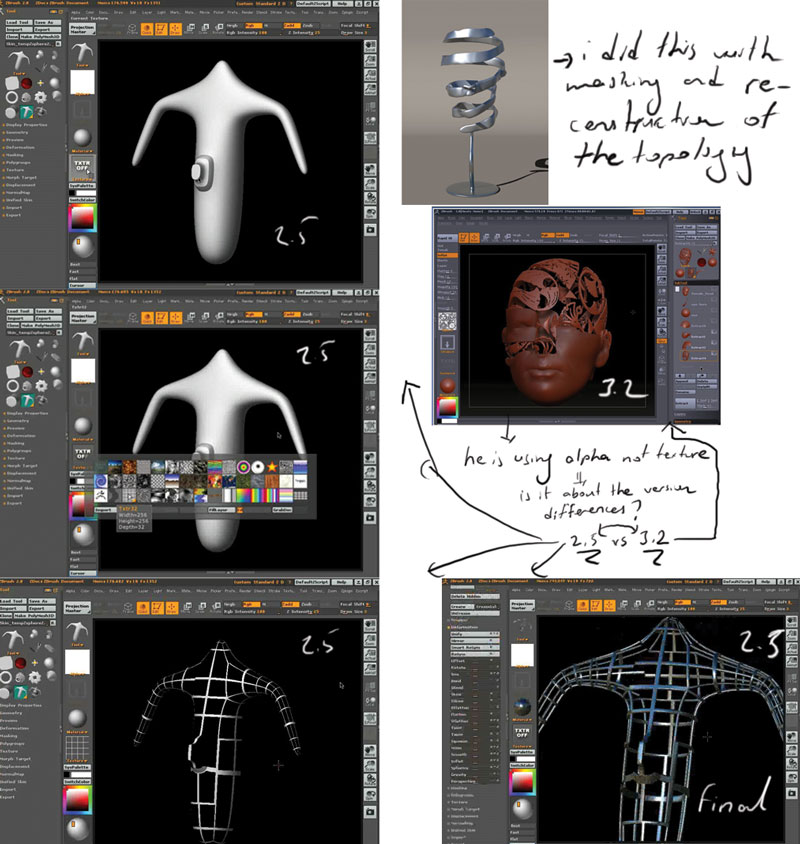
In ZBrush 3 it’s much easier. Simply mask the areas that you want to become wires, then use the Tool>SubTool>Extract feature.

You can read more about Extract in the online documentation. See my signature.