ZBrushCentral

why this happens?

Hi guys, i’m new at zbrush, and I wanted to solve a little trouble when I started to touch the software.
The image is attached. Please note the brush. When I draw fast this happens. I have to draw very slow to avoid this. What do I have to set? Or perhaps my machine has no performance?screenshot.jpg
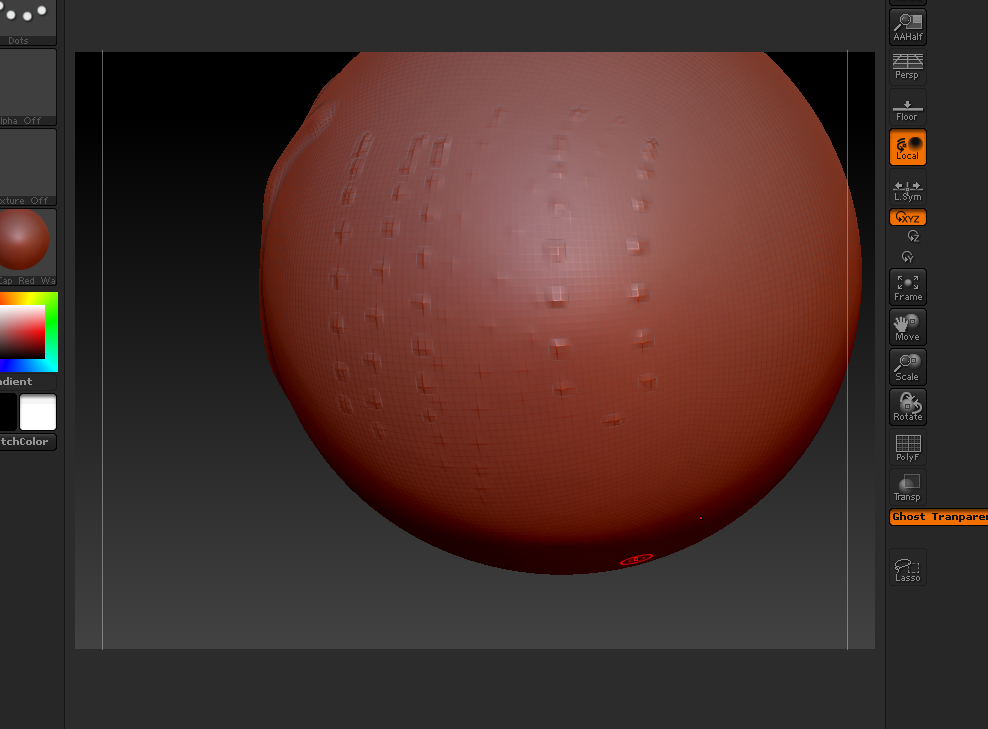
Thanks for yer time.

i too have same doubt…i think first you have to select free hand not doted…also tweak your mouse sensitvity…this will solve some problem…but there is always limits for your mouse…better to use a wacom tablet…

Yes, Mohamed, I have a Wacom. An Intuos3. :cry: I tried to set the tablet preferences, but nothing…

On the topleft of the screenshot you see ‘Dots’,
You should click this and set it to ‘Freehand’.

Problem solved!

if you enable lazy mouse (“Stroke” > [Lazy Mouse]) it will smooth between the points, just use a low ‘Lazy Radius’ if you aren’t making large curvaceous strokes. this may seem like a workaround but at least it works. also, the shortcut key is “L” to toggle lazy mouse.

@slice: sorry but that won’t solve the problem. But what will solve it is this:

Go to Stroke Menu. Switch on Lazy Mouse, go to Lazy Step and set it to the lowest possible value (not zero), drop the Lazy Radius to 1 and Lazy Smooth to 0.

That’s it. Happy sculpting.

Hope that helps.

worked! The last post helped. I did what slice said but it didnt work. I wonder if the slice’s solution had worked if I would have a more powerfull machine.
What do u say?
Thank u guys to everybody.

It’s not about the computer, it’s about how the Brush system in ZBrush works.

A faster CPU or more memory will help you with the overall ZB performance or with higher polygon counts, but it won’t really affect that basic way ZB works.

Have fun sculpting.

But then I don’t understand why this has always worked for me…anyone an explanation?

Freehand will still produce dots if you draw your line really fast. For most sculpting needs, the spacing is low enough. It’s based off of velocity, so the faster you draw the more spacing and dots.

Oke thank you James!

that lazymouse trick really works! thanks a million dsoellbuster!

Welcome. :smiley: