ZBrushCentral

Why is mesh transparent when retopo?

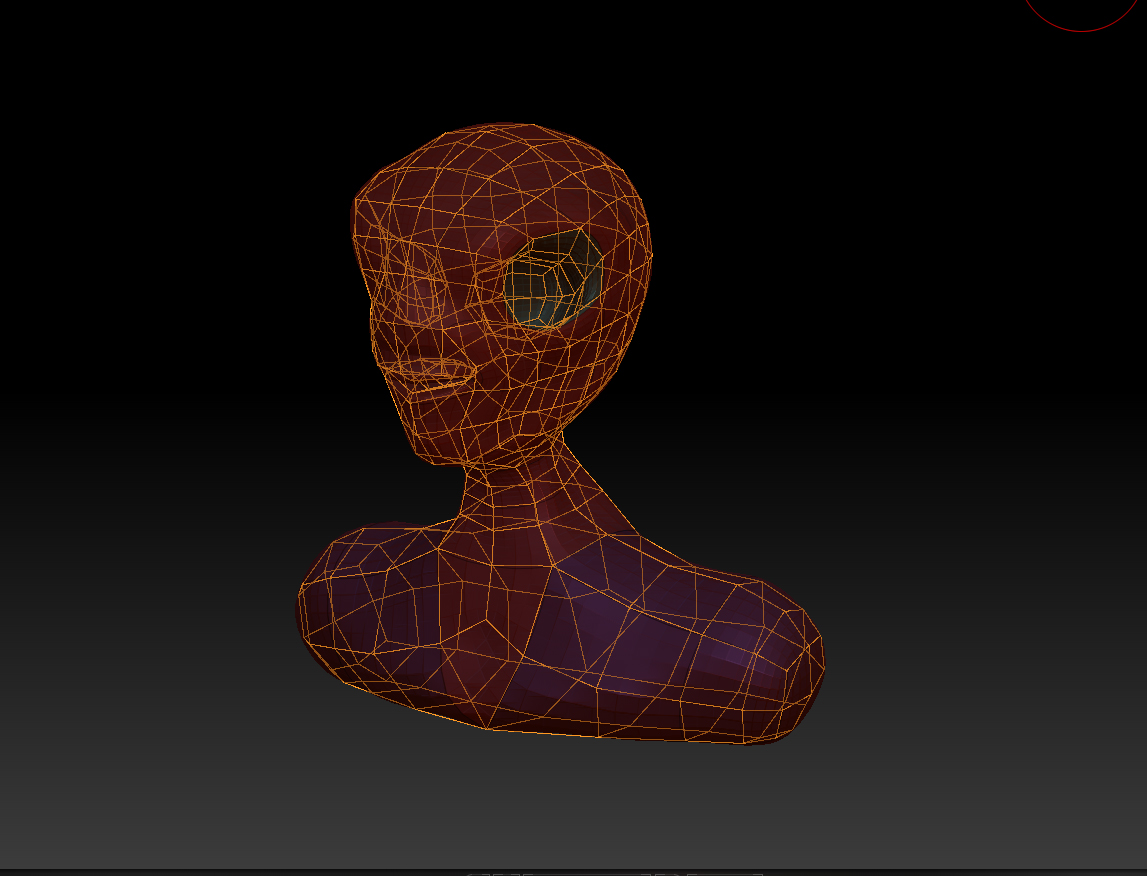
After I get my model into the workspace and add a zsphere, I go into rigging, and select the model, then go to topology and select edit topology and begin drawing on my new topology…the mesh is transparent…when I finish the front of the model and turn it around to do the backside topo, I can still see all the topo lines on the front of the mesh.

I hope I explained this right. Any help would be appreciated.

do you have solo mode on? or transparent/ghost?

plus ur in wrong section :wink:

Sorry about posting in the wrong place…but to answer your question, I do not have solo or transparency turned on…

Anyone else having this problem?

I have included a picture of what I am talking about.
You can see it would be quite difficult to work on the topology of the face with all the other lines from the back and side of the head showing at the same time.

Is there a way to adjust this so only the face is visible until I am ready to work on the back and sides?

Attachments

topology.jpg

Go to menu, Preferences > Draw and change Front Opacity to 0.95 and Back Opacity to 0.01

This will give you what you want, but it does have some side effects, like a partially buried retopo cage. Hopfully, retopo will be fixed in the upcoming update on September 20th., but it’s probably the best you can hope for right now.

Something else you might want to check out is Using Appended ZSpheres to Retopologize which doesn’t have the above problem.