ZBrushCentral

Why doesn't my Matcap look as good on the tool as it does on the Previews??

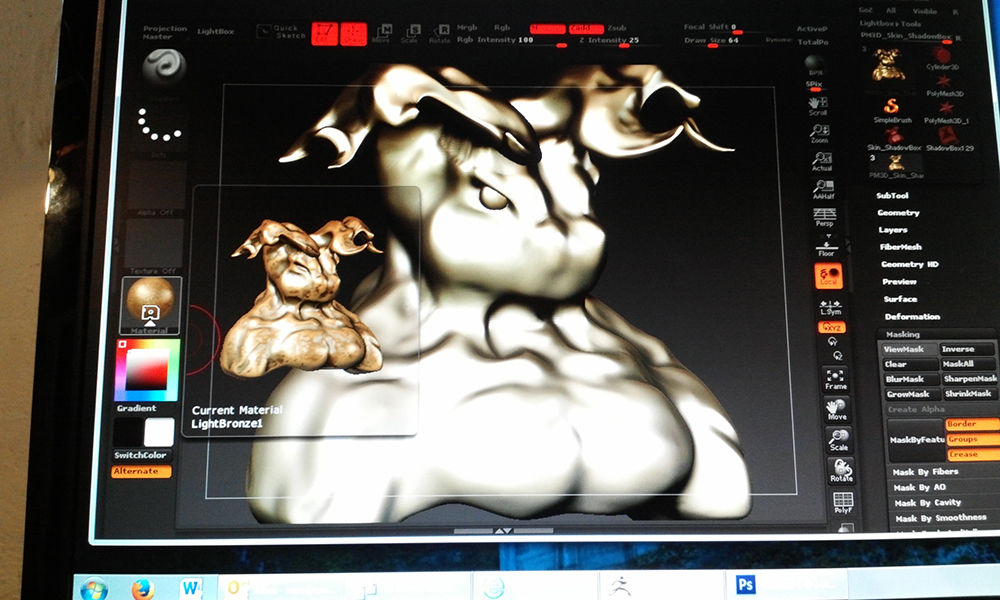
I attached a cellphone pic because my screen capture could not get the preview window so it***8217;s not totally accurate but gives a great idea of what***8217;s going on.
The materials look better in the preview windows of the material palette and tool palette. I don***8217;t know why, but the colors in the preview are richer, the shadows more prominent and the bumpiness of the material shows up, but not on the actual model. BPR does not help at all.
What am I doing Wrong?

Attachments
IMG_20140808_131218A.jpg

i think you have M turned on. you may have filled your model with a material.

with M turned on switch to the “flat” material and fill the model. that will reset it. then when you switch material it will look as expected. you have to be mindful of M and MRGB. it’s easy to forget you left it on.

Some of the older materials were made when the only render available was “Best” render. When you use those materials, do a “Best” render first then immediately do a BPR render over top of it.

Zeddie - that did reset my material - I always wondered how to do that!

However Zber - your reply was what did the trick for rendering properly. Zbrush is so weird sometimes. I wonder if there is a way to keep Best render On rather than automatically reverting to Preview.

Thanks guys!