ZBrushCentral

Why does ZBrush split my UVs?

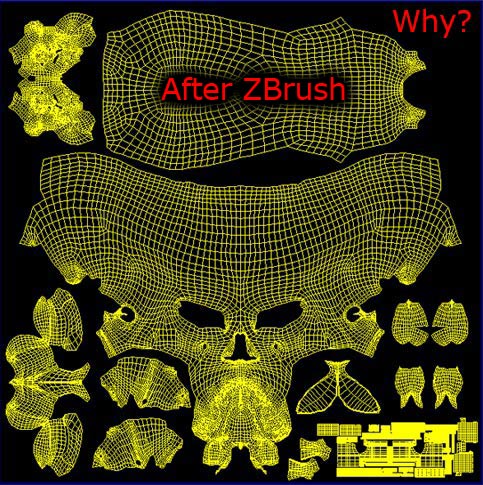
I set up my UVs in max, I export them as .obj, i do the zbrush thing, then i export my model back to max… By the time its back, the uvs are all broken up… this makes it near impossible to do little manipulations without welding them all together. Is there a way I can preserve their grouping?

Here’s a visual.
[UVSplit01.jpg]UVSplit02.jpg

What are your import/export settings for both Max and ZBrush?

Here are the export settings for Max and the import/export settings to and from ZBrush.
[ExportOptiions.jpg](javascript:zb_insimg(‘114093’,‘ExportOptiions.jpg’,1,0))

you should turn off all of the settings in Max’s exporter

go to the zbrush setting, then turn off everything but the texture coords.
that should fix that.

I came across this last night for the first time in a long time and it took me awhile to figure it out. This is a export bug in zbrush, not max or maya or any other program.

This may not be the same problem you were having, but for me the answer was simple. You have to have at least one sub division on your mesh when you export. You don’t have to export your model at sub d level 1, you can still export at level 0. But you have to have at least one sub division level on your mesh otherwise zb will break apart your UVs no matter what.

So after you have one sub division level, just hit MRG under tool > export and your uvs should be fine. :wink:

Eric-

You’re above reply should be made a sticky here :smiley:

Many times having both MRG & GRP checked on doesn’t hack it. Nor does ‘Cage’.

MRG checked on ONLY seems to manage those fickle OBJs though; especially when exported at min. level 1.

Many thanks for clearing that up :+1:

Chris

Oh, thank you very much, E .
I fixed this problem. :lol:

heya, just to add to the info pool.

Under TOOL>EXPORT>MRG & TXT have to be on.

I find if the TXT button is not on, my mesh splits up in max as well.

Thanks for all the info guys, fortunately a few things needed to be re-unwrapped anyways but, its good to know how to stop this in the future. :smiley:

heya,

well best of luck with your re unwrap!