ZBrushCentral

Why Do Objs Sometimes Import Transparent?

OBJproblems.jpg

Hi,

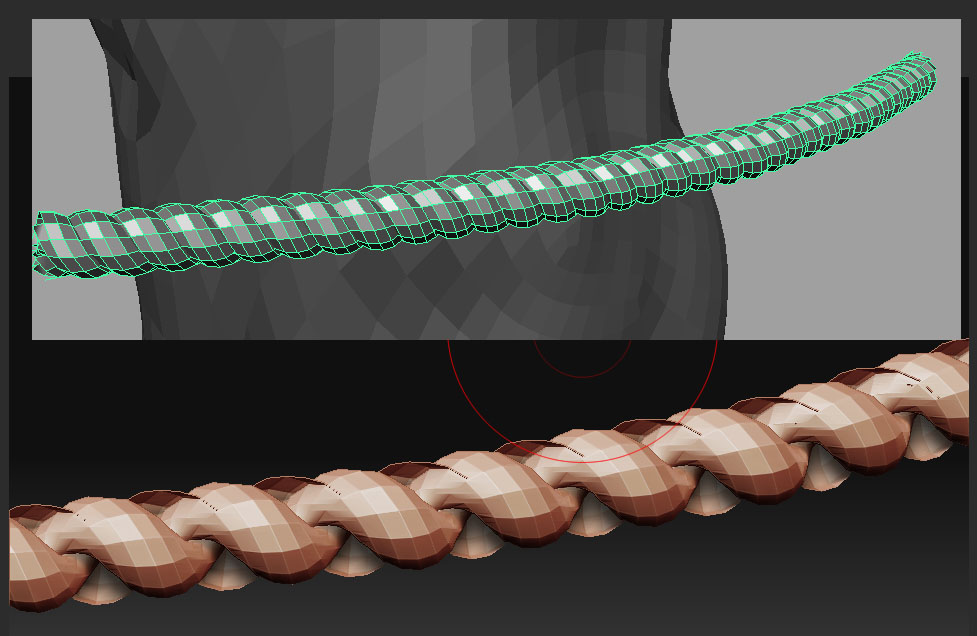
Does anyone know why when you import objs to ZB they are sometimes transparent ?

I attach an image to show what I mean. I get it sometimes where i have multiple objects are attached as 1 OBJ so i can reduce subtools in ZB - and it also seems to be when some of the bits of the OBJ model are intersecting . In the case of this rope I’m modelling i need it to nice and tight and closely touching so it looks right.

Hope someone can help .

Sorry just found this below :+1: -

http://www.zbrushcentral.com/zbc/showthread.php?t=69707

The model isn’t actually transparent. The normals are flipped. In most cases, this is a setting in the exporter of the app that you used to create the model.

Within ZBrush you can either turn on double-sided polygons so that it doesn’t matter if they’re flipped or not (Tool>Display Properties>Double) or you can actually flip the normals (Tool>Display Properties>Flip). Which is the best solution for you depends on exactly what you’re doing and how you need to work with the model.