ZBrushCentral

Which Material to use as a starting point?

Hi All,

I’m fairly new to Zbrush and the forums and recently started looking into making MatCap materials. The problem I’m running into is that I don’t know which material in the list is a good starting point for making what I need. Since you need to modify existing materials (by pasting shaders over existing ones), I am finding it difficult to know where to start. Is there a listing somewhere of which materials have which default shaders in them? Also, is there a way to add additional shader channels to a material or do you need to start with a material that has an expendable shader in it?

Can anyone point me to a good resource for this?

Thanks,

mobichan

The shader channels can be quite difficult to get to grips with and are not essential for MatCaps. The simplest way is to create a new matcap texture following this tutorial:
http://www.zbrush.info/docs/index.php/MatCap_in_Action:_Capturing_Other_Materials

There’s more info on the Wiki :

http://www.zbrush.info/docs/index.php/Types_of_Materials
http://www.zbrush.info/docs/index.php/Modifying_MatCap_Materials

HTH,

Thanks Marcus. I had run across those pages earlier in my learning, but rereading did help shed more light on my specific material need. It would have been nice if Zbrush allowed you to create your own material shader configurations, instead of looking through the list for a premade configuration in the existing materials. Maybe in Zbrush 4? :slight_smile:

I am also a bit confused as to what shaders are really doing when you have more than one of the same type of shader. Is there any guide to what redundant shaders are doing when combined in a material? By this, I mean what is happening when you have, say, two specular settings? or two ambient settings?

Another thing I am unsure of is whether I should be concentrating on using materials exclusively to color my model or should I polypaint the mesh and then use materials to add surface texture. It seems like any color in the material makes it difficult to polypaint because it fights the mesh color. Can anyone share what process they use so I can get an idea of what makes the most sense?

mobichan

Since MatCap materials aren’t affected by lighting the way normal materials are, can anyone offer a good suggestion on setting up lighting with MatCap materials? It seems like if I add more than one light, I get blown out lighting. And if I try to dim a light, it has very little affect on the model.

Should I be setting up the MatCap material to contain a fake lighting scheme? If so, is there any suggestion on how this works? Sadly, I have a MatCap material I am very happy with, but I feel like I might need to scrap it and recreate something similar with normal materials so that I can light the model the way I want.

Any help is appreciated.

mobichan

A MatCap material is not affected by lighting unless you have combine it with other shader channels. The whole basis of MatCap is a light/diffuse map (or maps - there can be two), either created by using the MatCap tool, by rendering a sphere in ZBrush or another application, or from a photograph.

For example, using the MatCap tool is demonstrated here:
KOSOVA’s MatCap Tutorial

Whether you use a colored MatCap or not will depend very much on what you are trying to do. As you have found, if you are polypainting then you really need to use a white material as a base, at least while you are doing the actual painting. Colored MatCaps can be used very effectively for some things where an over all effect is wanted.

It is possible to adjust the lighting but the method is best described in a tutorial - if you can wait, I’ll put one together and post sometime tomorrow.

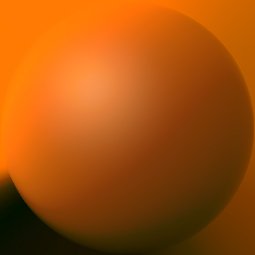
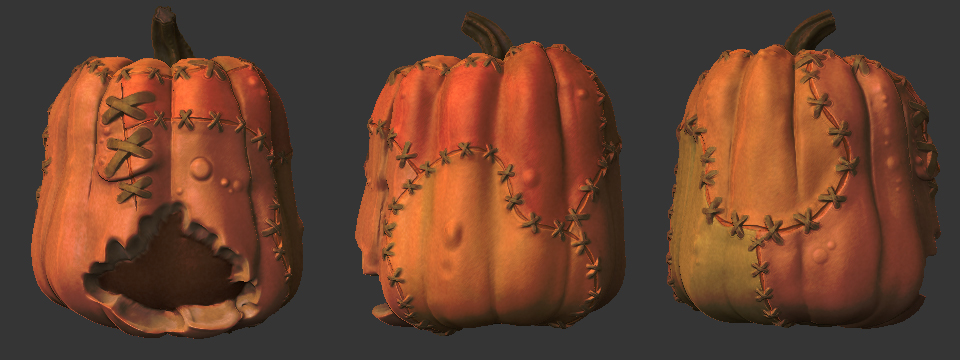
So, here is the material I am working on. It is for the skin on my pumpkinstein sculpt. I was really hoping to light the sculpt with some colored lights/dramatic lights, but (if I understand correctly) the MatCap texture determines the brightest and darkest extremes your model can be lit. I pasted the MatCap into a DoubleShade material and cranked up the desaturation sliders on the MatCap to mute the color so it didn’t fight with the polypainting too much.

ShadingMap141.jpg

I feel like I am approaching this with conflicting methodologies, so if you have a sec to throw together a tutorial, I would greatly appreciate it.

Cheers,

mobichan

Attachments

pumpkinstein_test01t.jpg

OK, here is a tutorial on Capturing and changing a MatCap texture which I hope you find useful.

With your example I am not surprised that there’s a fight between the polypaint and the MatCap! You might try the MatCap White to see how it looks - you can always add a color in the modifiers if you want to tint it. Alternatively, if you want to use the Light palette to set up colored lights you would be better off using a non-MatCap material like Toy Plastic as a starting point (you can reduce the Specular to take off the shine).

On the Shader channels, I can’t give you a definitive explanation. Most operate in an additive way but effects can change depending on which is S 1, which is S 2 and so on. The only way is to experiment!

One thing to note is that many material and lighting effects - such as colored lights - will only show in a Best Render.

Thanks for the tutorial. Hopefully I can get better results after playing a little more with MatCap and regular materials.

mobichan