ZBrushCentral

Where is Convert To Main (Topology) in ZB4 (answered)

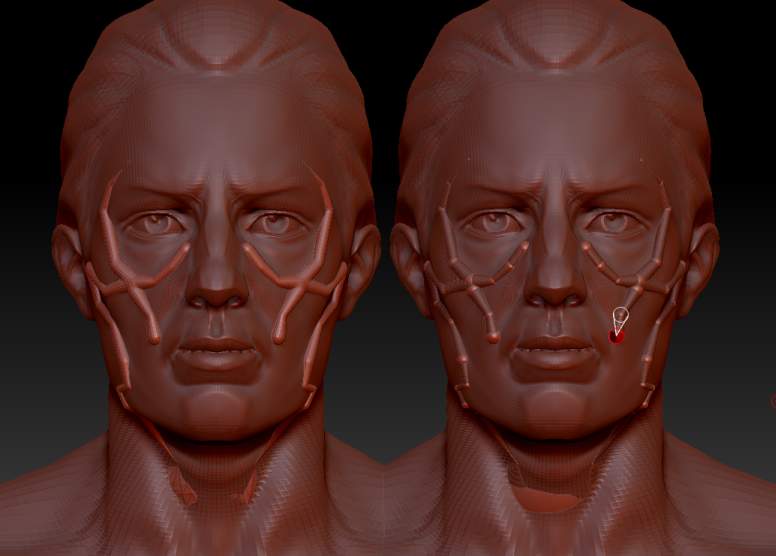
It seems that “Convert to main” in the Topology palette has disappear in ZB4 (at leat on the Mac). Basically, it convert topology line to Zsphere and it is very convenient to do things like vines on an existing topology.
This is a very could feature that I like to use.

Could someone at pixologic tell us about that?
Is anybody there, with the right answer ?

The answer is that it was taken out for technical reasons. However you can very easily do what you want:

  1. Select the mesh you wish to create the vine (or other thing) for.
  2. Append a ZSphere as a new subtool.
  3. Select the ZSphere and move/scale to a start position.
  4. Start drawing new ZSpheres. If Ghost Transparency is OFF you will be able to draw on the surface of the mesh.

ZSphere_vine.jpg

that is a shame, it was great for making things like hair, and other very complex shapes.

Many Thanks Marcus,
It was what I was searching for.

This is NOT the same functionality, and while similar under certain circumstances, is lacking the ability to:

• create multiple, separate zsphere chains.

• easily create ropes that run in straight lines across peaks of contours avoiding valleys, like a taught rope would.

• easily maintaining uniform line thickness without variation.

I would love for someone to tell me I’m wrong and show me how I can easily achieve these things, but for now I’m relegated to importing subtools into a different app and using a pipe tool. It’s a definite workflow buster, and slow and finicky. I’d welcome this functionality within zbrush.

Yes, you’re right and I need the old tool too for a better workflow.

create multiple, separate zsphere chains.

Certainly zsphere chains must be connected to the root but you can break the chains by using Classic Skinning and Alt+clicking a link sphere.

easily create ropes that run in straight lines across peaks of contours avoiding valleys, like a taught rope would.

When drawing zspheres on top of another mesh, simply click on the peaks to create zspheres.

easily maintaining uniform line thickness without variation.

Draw a zsphere and then press Shift to size it to the same size as its parent.

without convert to main you cant do miraculous things like this anymore in zbrush :frowning: http://www.youtube.com/watch?v=HJ4JK-3b2ds and [http://www.zbrushcentral.com/attachment.php?attachmentid=59959 thats](http://www.zbrushcentral.com/attachment.php?attachmentid=59959 thats) reason alone to put it back … :\