Hello Experts
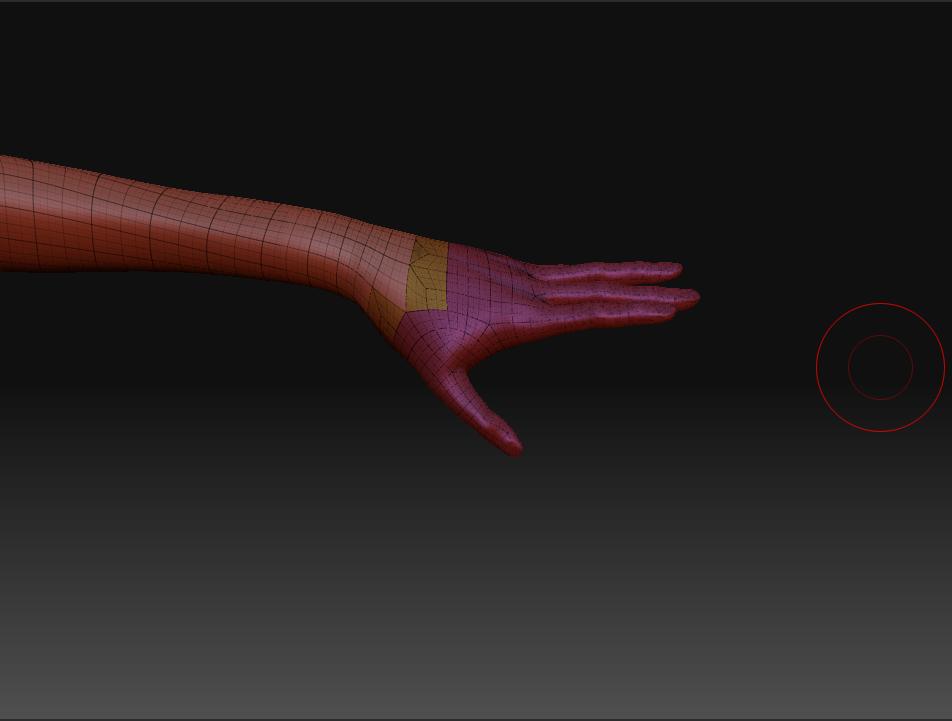
I think I press the wrong key and i end up have the mesh like this.
What is the purple part? How did i do that? Is anything i can fix it back to original mesh?
Thank you!
Attachments
Hello Experts
I think I press the wrong key and i end up have the mesh like this.
What is the purple part? How did i do that? Is anything i can fix it back to original mesh?
Thank you!
You accidentally went in to Frame mode, which shows you your polygroups and your wireframe. The purple is a polygroup. Shift+f will toggle it on and off.
i know thats frame mode. my problem is one of the hand is smoothed. is any way to make it back to the original one? ( un-poly group?)
I think there’s some miscommunication happening here. Polygroups have nothing to do with smoothing. I don’t believe you can delete polygroups altogether once one has been assigned, but you can make your entire tool one polygroup by having the entire tool visible and hitting Polygroup>Group Visible.
As far as it being smooth, just use the Subidivision slider to take it back to the base mesh.
you created a local subdivision.
if you have a mask on and you divide at the lowest subD it will create what you see. A division only in that area. It is to get more topo in a certain area. But…as you can tell, it has problems, all those triangles!
There isn’t a way to get back the original mesh…unless you can undo back to it.
You can project your mesh onto the original mesh though.
local subdivision, now i get it. thank u for the explanation.
PS; what r u trying to say on this “You can project your mesh onto the original mesh though.”
I’m saying… If you’ve done a lot of sculpting on the mesh with the local subD on it. But you want to retain all of that information on your Original version you will need to project the details from the one mesh onto the other.
Do some searches on how to project details from one mesh to another if don’t already know how to do so. There is a ton of information on here, pixologics site and on the wiki.