ZBrushCentral

What is the best way to remove indented areas?

Hello, I am working to smooth a model of a terrain. I have a bunch of indented artifacts in the object that I want to fill in. I can paint these dents in with the simple brush and then smooth them. But I am wondering if there is a brush that will only fill in indented areas? I have been using the smooth tool but it pulls the sounding areas down as the dents come up. Also when doing a lot of smoothing is there a way to set the brush to be the smooth tool without having to hold the shift key down all the time?

Thanks,
-JOe

Attachments
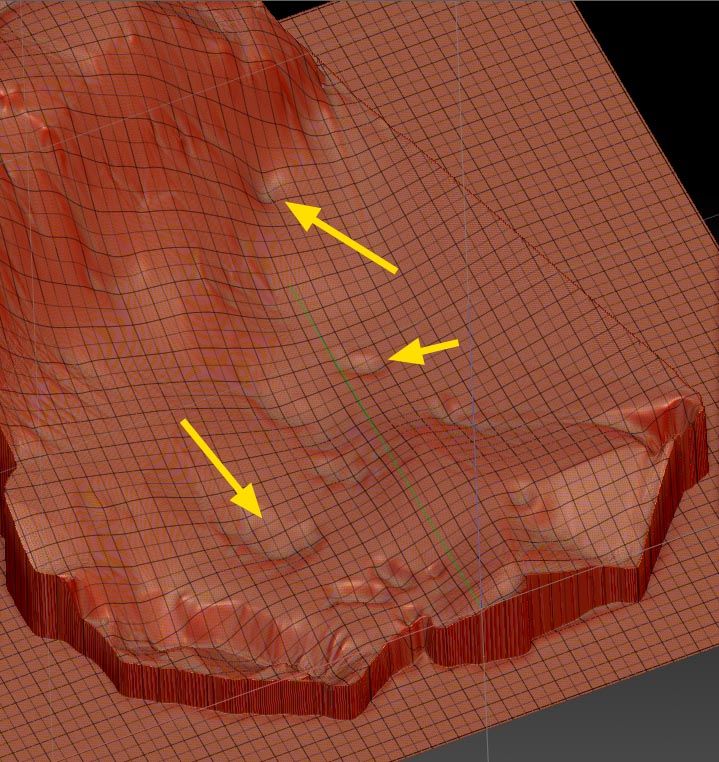
deep_artifacts.jpg

On Flat surfaces, the Planar brush is ideal for this, if you hold down Alt while using it so it flattens "upwards " to the desired level.

Your situation is more complicated because the surface is uneven, you you could pick a spot adjacent to the “indentation” that you would like to spackle in, and it will flatten up to that level. But then you’re still left with a flat section that will need to be further smoothed in order to blend in.

Many of the other brushes can be used to simply build up the areas in question. I’d choose one with a subtle effect like form soft to gently build up form in there.

Keep in mind you can always mask the offending areas, apply a blur to the mask so there are no hard edged transitions, and invert the mask so you can work only on those areas without disturbing the surrounding detail.

You can use the Clay Buildup brush to fill in the holes then Smooth and/or the Trim Dynamic brush and a final Smooth to get them where you want them. Think of it like you are actually shoveling earth into the hole with the Clay Buildup brush and grading it with the Trim Dynamic brush and/or the Smooth brushes.