Spotlight is gone in the texture tab in R2. Has it been moved to another place?
I can see the open spotlight button in the File menu,
but it only opens a system menu for me to search for it to open!
What is happening here!!?
Danne/
Spotlight is gone in the texture tab in R2. Has it been moved to another place?
I can see the open spotlight button in the File menu,
but it only opens a system menu for me to search for it to open!
What is happening here!!?
Danne/
Select a texture , add it to spotlight and Spotlight will open.
I don´t have the buttons in the texture tab that was there in 4.0!
It seems that spotlight is gone!
Is there any shortcut to add to spotlight?
Could it be problem with that I´m using OSX Lion?
Danne/
Can you show a screenshot of ZBrush 4R2 with the Texture palette open?
It´s not much to show it´s simply the textures palette with all there, except for the spotlight buttons.
All other buttons is moved to the left!
But I will take a screenshot when I get home from work today and show what it looks like!
Danne/
The same happens here although I think it may just be a reorganization of the pallets.
It shows up (took me a while to find it) under the texture palette but not where it used to be on the left hand palette where I used to normally import the textures next to the import button.
I cannot figure out how to have a bunch of textures or reference images on screen at one like used to be able to do either.
Screen shot supplied.
Mike
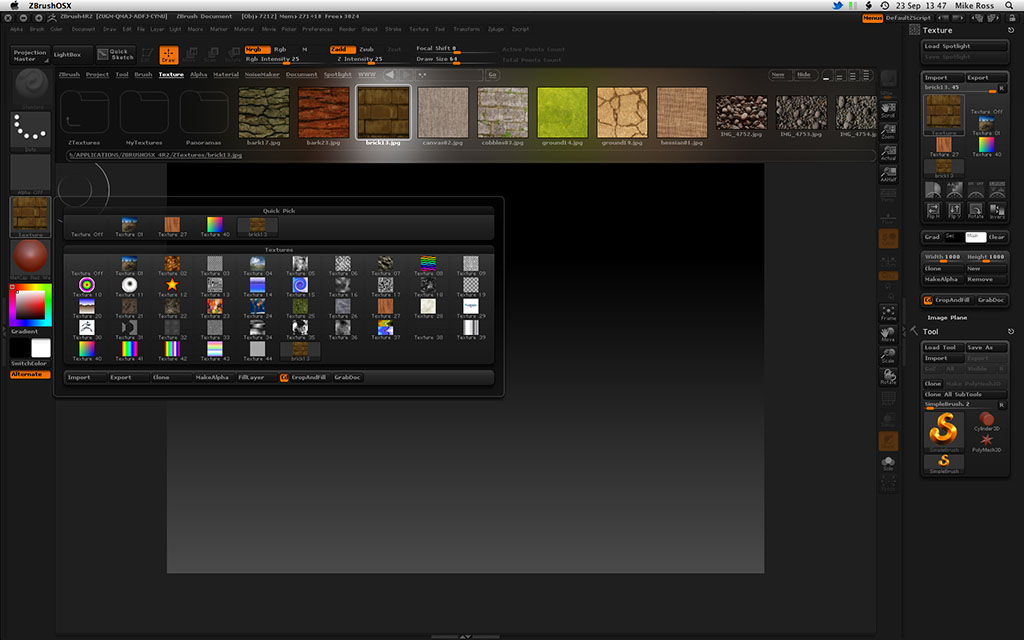
Thanks a lot!
There it is!
Perhaps this needs to be mentioned in the ‘New i version R2’?
Danne
OK, thanks, I understand the confusion. I’ve added a note in the online docs.
mykyl,
To launch Spotlight, use the Texture > Add To Spotlight or Turn On Spotlight buttons. (Loading a Spotlight will not automatically turn it on.)
To use Spotlight as reference images, rather than for sculpting/polypainting, turn off Brush > Samples> Spotlight Projection.
EDIT:Got the spotlight and texture to work, still no ability to web browse
It says somewhere that web browsing is not available at all at the moment as the companies they use are doing something. Cant remember if its on the release info for zb4r2 or where, but it is mentioned.
Mike
I’ve got a slightly different problem. How do I get the Spotlight Ring to appear again after I turned Spotlight off with SHIFT-Z. I remember vaguely that it used to be pressing just Z but since then I long ago reassigned that Shortcut.
So each time I disable Spotlight now and turn it back on I cannot get the ControlRing back even by Clicking on one of the loaded Images. Was there a button somewhere that got moved or renamed in Z4R so my old Shortcut “`” doesn’t work anymore ?
Found it. There’s an EditSpotlight Button in the Transform Palette.
Yes, i can see the button, but hes grey and i can’t use them  and my spotlight will not run with Shift+z.
I love the spotlight-tool, but how can i use it in R4.2?
I’m very confused.
Greetings
Jörg
*edit
Yes, i found it! It must first to be activate the “Turn on Spotlight”-button (found in the Texture Menu on the top). Now it runs with the shortcut Shift+z.
Hope it helps other user, to be afflicted with blindness like me 