What does the double outer lines mean? I am using ZBrush 4R2 and have never seen these in previous versions.
Attachments
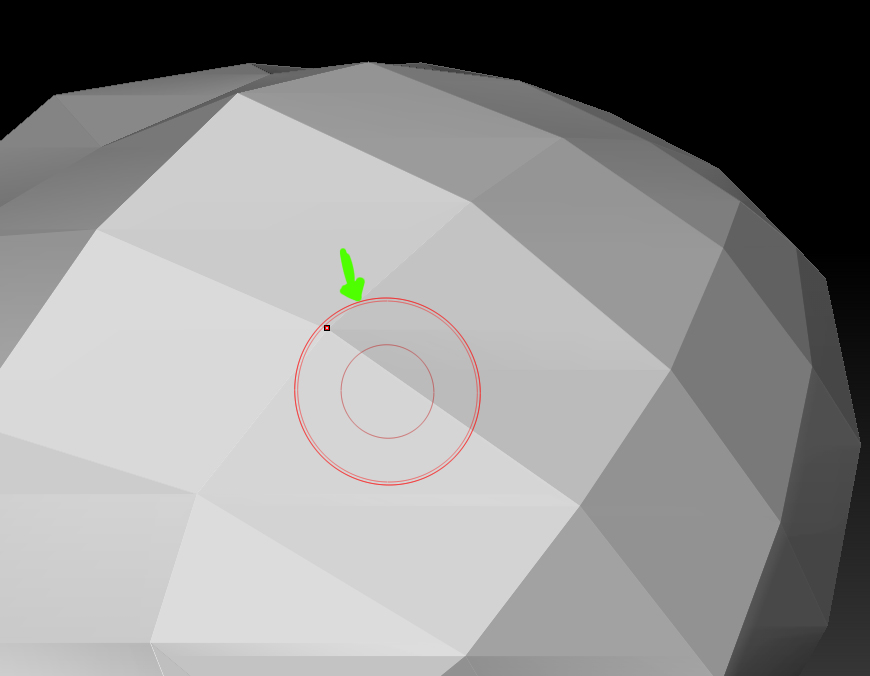
What does the double outer lines mean? I am using ZBrush 4R2 and have never seen these in previous versions.
It shows symmetry is on.
Thanks Marcus.
Now I don’t need to put a custom icon on my shelf to notify me symmetry is on.
Hi,
i have created this base shape of a pistol using the curve quad fill brush; then i turned it into a dynamesh and used the slice curve brush to cut it into pieces
now i noticed that my cursor changes while i am moving the mouse over the model
this is quite annoying as the cursor size changes as well
cursor in smooth mode while over the side of the model
cursor in smooth mode while over the edge of the model
can anyone explain whats going on here?
i do understand that the cursor changes while i use the curve brushes; but i don´t understand why i have this two different cursors after i have left the curve brush…
thanks for advice
edit: workaround: i exported the subtool as an obj, reappended it (deleting the old subtool), cursor is back to normal…
m
MichaelMaehring,
The cursor changes to turquoise blue when in Edit Curve mode. Possibly there was still an editable curve somewhere.
Also, please don’t add new questions to old threads, start a new one with your question. You are much more likely to get a prompt answer that way. Adding to old threads risks not getting an answer at all!
Thanks,

