ZBrushCentral

What am I doing wrong?

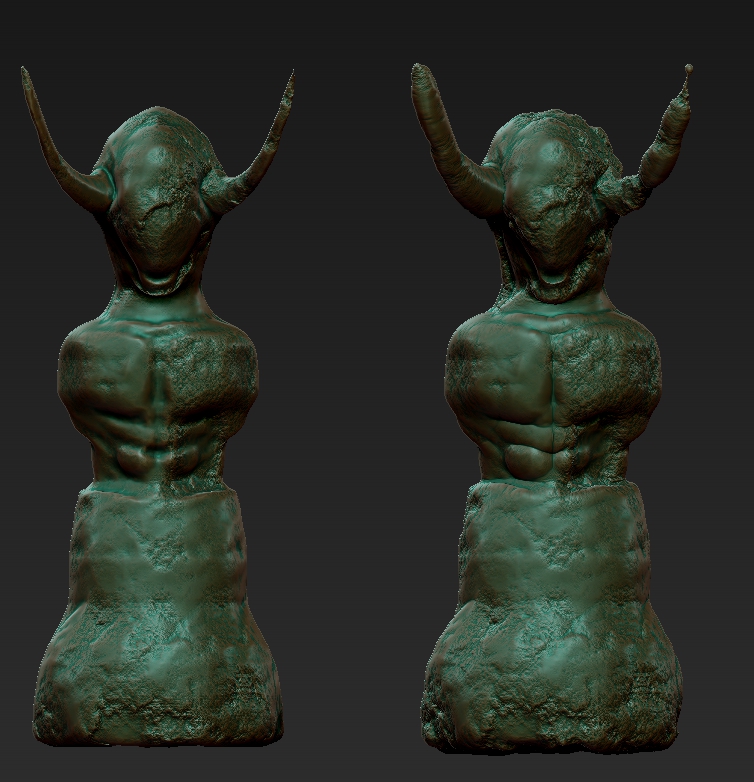
The image on the left is has surface noise on. The one on the right is from after applying noise to the mesh.

Is there a way to apply the desired noise without this inflating effect?

As a bonus, I would be very glad if anyone could point me to directions on how to use the noise brush… as it is, I am unable to see anything on the mesh when I use it.

Uh, and one last thing: right now I am on V4R3. I’ve already downloaded R4, but just can’t find the time to put it to work. If what I need is ‘just’ upgrading, please let me know!

Thanks in advance.

Attachments
ZGrab01.jpg

Now is 4R4 P2
take a look here
http://www.pixologic.com/zclassroom/homeroom/lesson/noisemaker/

Ok, but these videos were released before R4 and the puffing/magnifiying effect does not happen on any of the examples, nor did I see there any advice to avoid this effect…

Can this be a side effect of using dynamesh on the model?

Inflation/deflation is normal behaviour for noise as I understand it. You can limit the inflation as much as possible by putting the SNorm slider right up to 100, but its effect is limited.

As for not seeing any inflation in those videos, it all depends on the settings for the noise in question – particularly the strength and scale settings.
If you haven’t seen it already, here’s the docs page:
http://www.pixologic.com/docs/index.php/Surface_Noise