ZBrushCentral

Weird result when importing OBJ (Maya to ZBrush)

Hi,
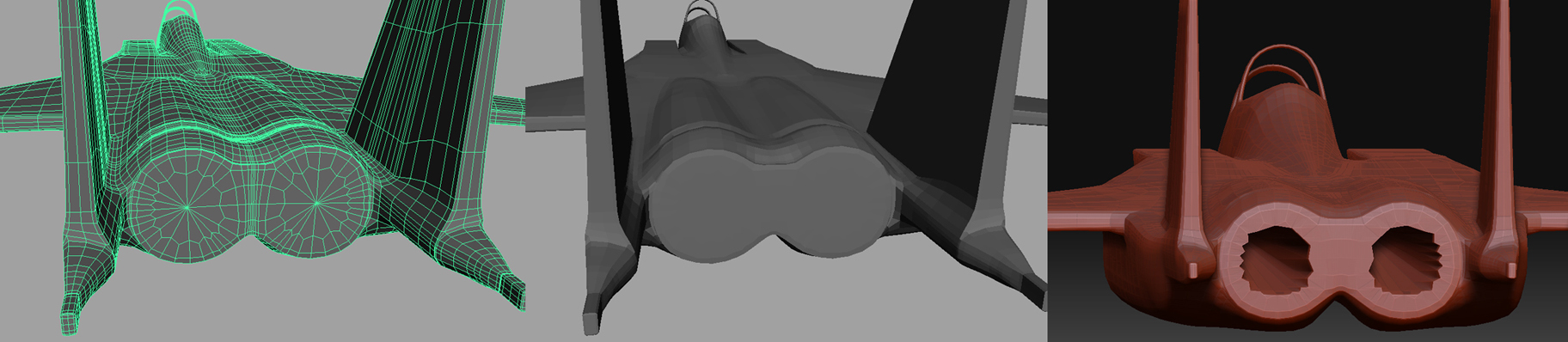
for some reason when I export this mesh to OBJ from Maya and import it to ZBrush I get these holes in a very specific area… it happens only after I divide the mesh in ZBrush.

In the attached picture you can see the way it look like in Maya on the left and the problem in ZBrush on the right.
There doesn’t seem to be a problem with these polygons in Maya, normals are in the right direction, points are merged etc…

Help?
Thx :slight_smile:

Attachments

BackProblem.jpg

First make sure that your verts in that area are welded in Maya. Also ZBrush doesn’t like tris and n-gons. Do your best to only use quads. If you have to use a tri, put in a hidden, inconspicuous area. I would recommend adding more edge rings to that area in Maya as well.

db

These are not triangles and not n-gons… these are polygons :confused:

indeed is polygons but they look a little bit weird, try to wld that last point and make another loop at the end, that solve your problem i think :+1:small_orange_diamond:+1:

MY DOMINANCE WAR IV - BARATHOR

I

I just tried it… made the holes smaller but the problem still exists :frowning: