Hi guys,
after hours of modelling a head I discovered I have this weird bunch of polygons behind one eye:
Now I can’t seem to isolate them in any way. Does anybody know how to proceed in Zbrush?
Many thanks
Attachments
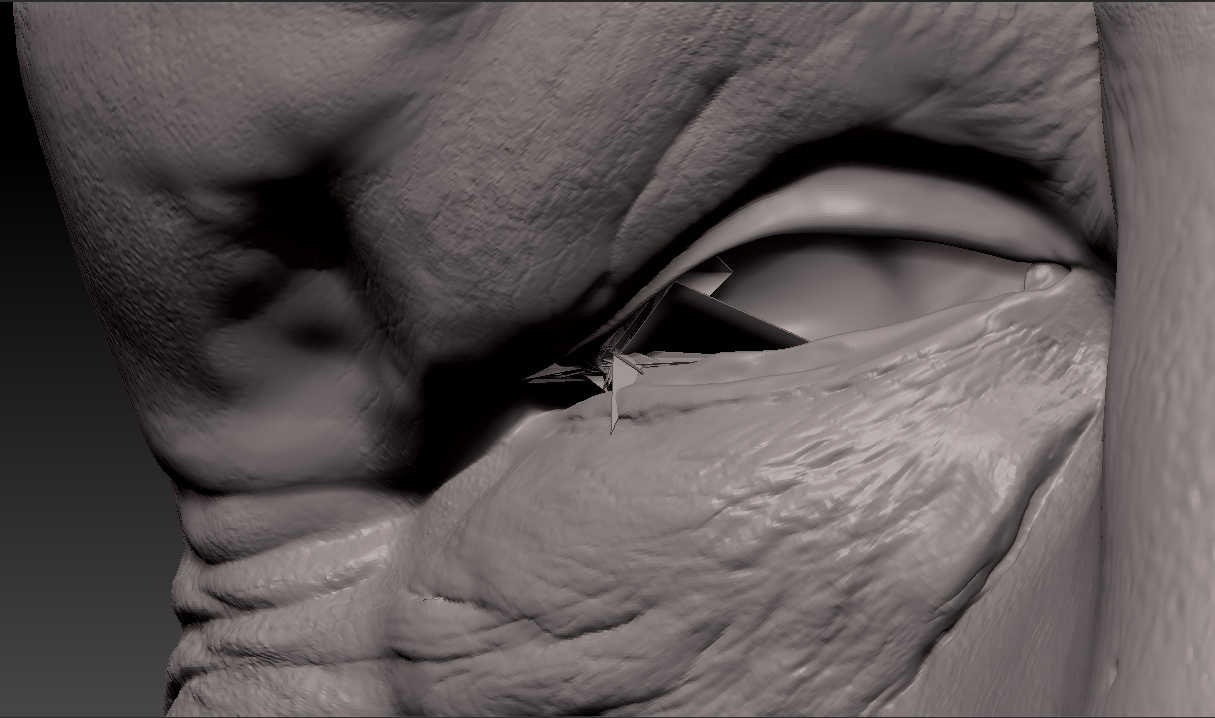
Hi guys,
after hours of modelling a head I discovered I have this weird bunch of polygons behind one eye:
Now I can’t seem to isolate them in any way. Does anybody know how to proceed in Zbrush?
Many thanks
Drop to lowest sdiv level and use move points brush, enable PolyFrame to see where to put them.
Hi thanks for the answer. Do you mean the Move Topological?
No, I mean move points, topological works on a larger area.
Sorry for my technical ignorance but I’m a traditional sculpture just recently started in Zbrush.
The only reference I found to “Move Points” is this procedure in Edit Topology: http://docs.pixologic.com/reference-guide/tool/zsphere/topology/
Is this what you are mentioning?
Sorry it’s move parts>> B,M,V. you probably will want a small draw size.
Thank you, I’m gonna try that!
This is really quite annoying, I’ve tried to fix the polys one by one. Everything looks decent at lower levels but then I have a wonderful fountain of polygons at higher levels!
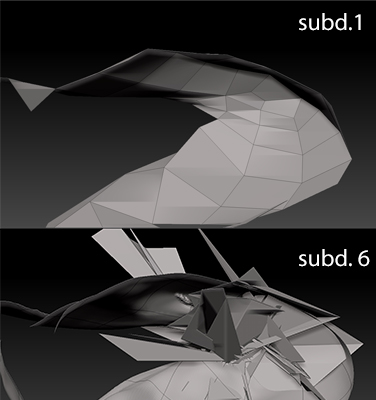
You could try smooth peaks B,S,P. It’s better if you can avoid the issue with good modeling from the starting mesh.
Yeah, I’m pretty sure the mesh was good enough but probably I pulled some polygon along the way by mistake.
I’ve had that happen a couple of times, always with meshes I imported.
I found it a tough one to fix, I used a combination of Move Points and Move Topo set small so I could pull some gremlin points inside the mesh, and clip others off entirely. Frustrating and time consuming to say the least.