ZBrushCentral

Very problematic Displacement

Hello.
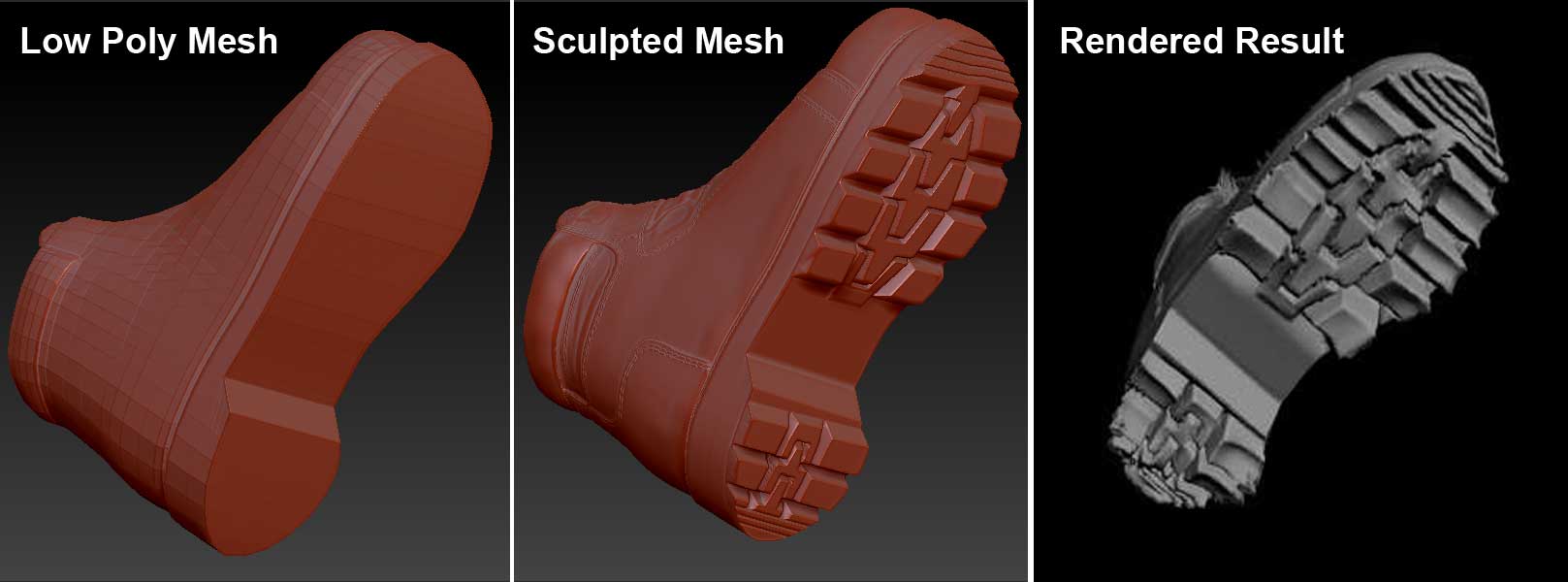
I sculpted a model of a boot. the low res model was created in 3ds max, then sculpted in Zbrush, a 16bit Diss map was created, and rendered in 3ds Max 2011 using Mental Ray. All the boot looks fine except the Sole.
Not only it is not straight, but there are spikes at the edges.
There are no overlapping Uvs, and the diss map looks ok.
Anyone knows why is this happening?
I’ve attached an image that shows the problem.

Thanks in advance

Attachments
Problem.jpg

Did you restore your base mesh before creating the displacement? If you are using your original low res model in Max you will need to do this so that the displacement is calculated correctly:

  1. Go to the lowest subdivision level.
  2. Store a Morph Target.
  3. Import the original mesh.
  4. Generate the displacement and/or normal maps.
  5. Press Tool>Morph Target>Switch before moving back up the subdivision levels to generate texture maps or continue sculpting.

Hi, Thanks for the reply.

Hes i did that, and the result is what you see.

OK. If you used Adaptive for the displacement try turning that off and creating a new disp map.

WOW! I disabled “adaptive” and the problem is solved.
Thank you VERY MUCH for your help.
Is this some kind of Bug? I noticed that “adaptive” also causes problems if you sculpt on a mesh of triangles (such as a garment from 3ds max) and create a normal map.

Yes, it’s a known issue. In ZBrush 3.5 R3 Adaptive mode can ignore your imported mesh, calculating the displacement for the level 1 subdivided mesh. As that is slightly smaller than the imported mesh the displacement can look ‘puffy’.