ZBrushCentral

Very new to Zbrush

Hiya,

Ive only just started working in 3D (self teaching) as ive always been a 2D photoshop lass. The transition is weird but cool. This is one of the first things i managed to put together, basically me just messing, trying to find out what brushes do what lol.
So i thought i would post, pop my zcentral cherry.
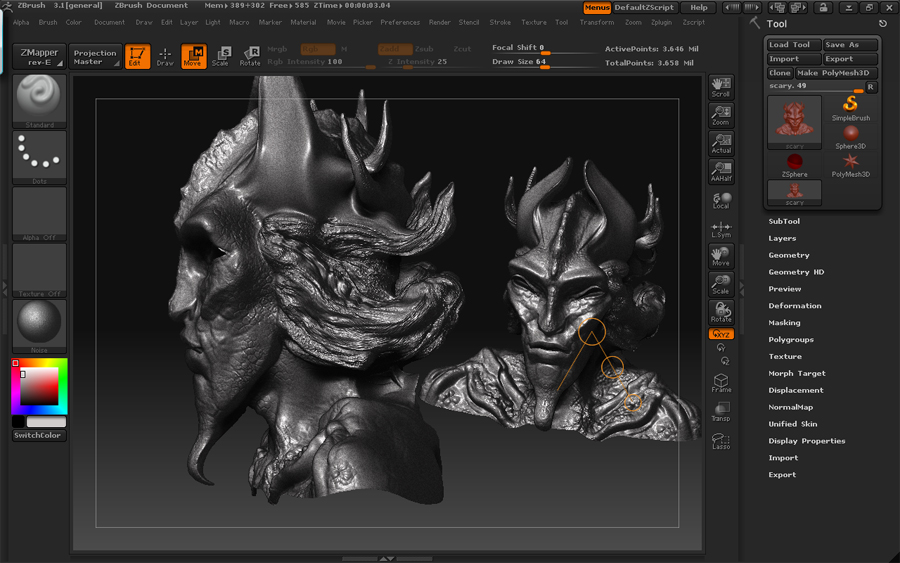
scary.jpg

Btw, this may be a silly question but its the simple things that confuse me the most so bear with me. From someone that is only really used to photoshop, what is the main difference in zbrush between using subtools and layers editing wise?

Thanks. :slight_smile:

All help and critique welcomed.

wow ! I’m a “photoshopper” too but this is great for a first try…

are you using a tablet? 'cause I only work with a mouse (for financial reasons) and it would explain why everything in here looks so good and my stuff looks so ****ty…

Pretty good for just getting started. :slight_smile:

Subtools in ZBrush are intended for you to be able to break up your project in a more organized way that allows you to maximize your ram usage and general workflow. So if you wanted to add a belt to your character, you could without committing to it since you could just delete out the subtool later and retain everything else without having to resculpt that area. Each subtool has it’s own history too which is cool. Now, as far as layering goes, do this on your highest subdivision levels (so they affect all lower sub-d’s) and you can effectively add small details like pores, wrinkles, damage, etc. Or they’re even useful for doing simple design alterations so you can sculpt a different type of nose entirely or a different head design, etc. Make sense??

Thanks so much! XD

Its my second attempt at using the demo head to make something creepy lol.
I dont use a tablet at the moment, i have one but its rather rubbish so until i get paid im much like yourself stuck working with the mouse. Boo hiss.

Thanks hun! XD

Oh i get ya, so in essence the subtools are best to use as ‘layers’ for the construction of the thing itself whereas the layers are better to use for texturing and tinkering etc?

Thats awesome, thanks for taking the time to explain that one, i hope ive understood you correctly haha.

At the moment everythings still a little -edit-draw-dropping to canvas-dammit why cant i edit it-damn-cant colour-no i didnt want to draw another shape.

:slight_smile:

very good start!
personnaly i use a lot of subtools just as if i was using layers in Photoshop…
Like that i only focus my attention on each single object.
Than i use 3d layers for details or when i’m not sure of what i want to do…
Layers are very powerfull and don’t forget that you can have layers for each subtools…it gives you a lot of liberty!
keep going!!!

Thankyou so much! And thankyou also for the pointers, they are much appreciated :slight_smile: