ZBrushCentral

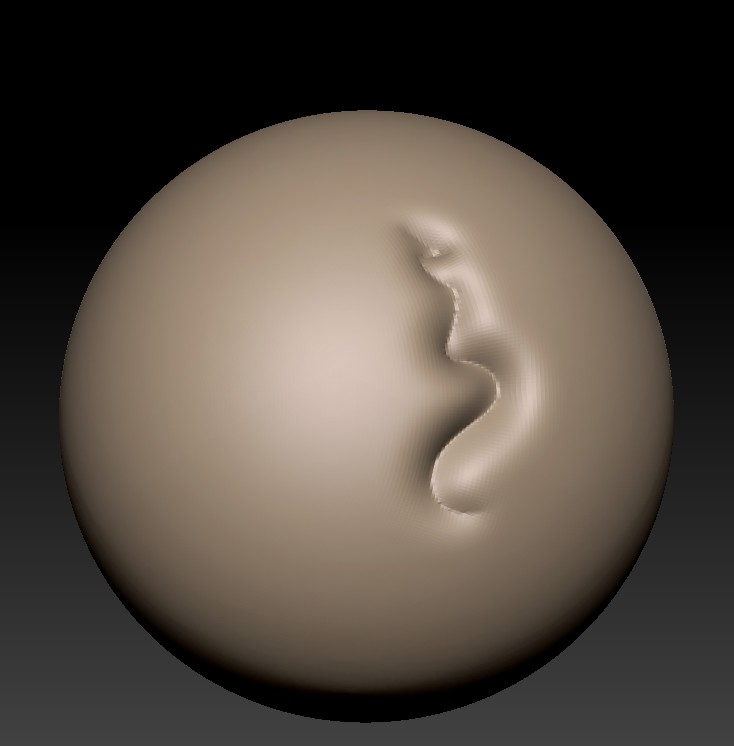
Very nasty sculpting artifacts

Im getting these extremely nasty sculpting artifacts.
This is what Im getting when Im sculpting
Zbrush_Fuckup1.jpg

I have no idea what’s causing this, but I’ve noticed that it happens more frequently after a save. This makes Zbrush practically useless. Any thoughts on how this is happening and how to fix it?

Thanks.

Attachments

Zbrush_Fuckup2.jpg

Nobody?

I came over this today as well. I have no proper workaround, except exporting the model as an obj and importing it again. It seems to be project based, meaning if I switch projects, I can sculpt just fine.

It becomes absolutely impossible to sculpt when this is happening, so I’m really hoping for a fix.

I know this one!
GRIN!

I don’t know why it happens but I get it too, and usually if you keep working Zbrush (at least for me) will crash.

What I do is save the object as a .ztl and quit and re-open Zbrush, and poof, every thing works fine till it happens again.

– oh yah, don’t worry if it looks messed up when you save it, that “artifact” is actually just some weird thing spewing out of your video card I think (don’t hold me to that its a guess). Anyhow save and reopen and that crap will be gone, its not actually there.

I hope this helps

Cheers!
Mealea

Ah, thanks. I’ve tried to save as a .Ztl, but it was still messed up. However, I didnt restart Zbrush. I tested now, and it seems to work.

It bothers me though, because I can’t reproduce it; it seems to be pretty random. At least, I haven’t found a pattern to it.

heh…
Not being able to reproduce it is one of the reasons I think its video card related…

one of the things I sort of remember about it is that it seemed at least once to have to do with zooming in and out…

so its gone now right?

try changing some of the settings of your videocard’s control panel. Maybe it will improve the the performance.

Well, I’ve experienced this on two different computers now. I built a new one a week ago, so the drivers are up to date. If it was a video card problem, I would expect it to screw up Zbrush at all times. However, it doesn’t. When I encountered the problem today, I immediately switched to another project to see if it worked there. It did. I then went back to the screwed up one, and it was still broken.

So, this leads me to the conclusion that it’s a ZBrush bug.

It could be a ZBrush bug because alot of people are building new computers with fresh new hardware installed and ZBrush may not be 100% compatible with them. But depending on how you use ZBrush can determine how resources in your computer are being used. I heard Zbrush uses mostly RAM to run all the polygons/pixels in your model and then it uses the processor to navigate around your model. I haven’t heard of ZBrush using resources from the video card. So maybe your RAM is not fast enough or you dont have enough or maybe it’s your CPU.

I have 16 gig of ram and a pretty fast CPU (i7 3,40 GHz), so it’s definitely not lack of horse powers. Also, the model I had problems with was perhaps 400 k polys. I still don’t see how this could be anything but a Zbrush bug. If it was my hardware, I would experience this every time I used Zbrush, and it would certainly not be project dependent.

Ok. I had this issue and I have the answer. Thanks to Paul at Pixo as I wasn’t clever enough to get what I was doing wrong. (these are edited words from the answer I got and it sorted me out 100%). If needed I’ll do you a video showing the error and how to resolve it.

I’m a long time ZBrusher and my workflow from the old days was causing the issue. The issue is because you keep coming out of 3D mode by turning off the Edit button and then zooming in and out of the character or somtimes resizing using scale and the manipulator.

In older versions I used to exit edit mode, move up and down with the tablet pen to make the ZTool come in and out along the Z axis (depth)

You don’t want to do this workflow.

When you are zooming when not in 3D mode you are not actually zooming. You are literally moving that ZTool in the 2.5D Z-depth. This is why you run into this issue. You move the ZTool only in 2.5D and then back into 3D mode where the 3D brushes are miss reading the z-depth.

If it’s not working for you or not clear then let me know and I’ll do a quick example.
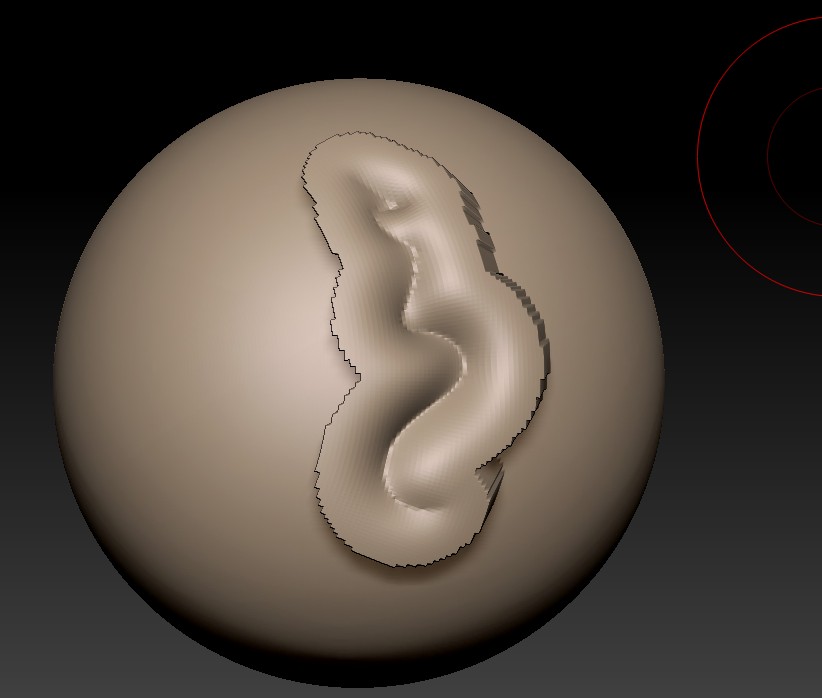
Thanks a lot, Glen. I successfully managed to replicate the issue now. I can’t believe this isn’t fixed though. Sure, when you know why it happens, it makes sense, but I cannot imagine a single scenario where this is the desired behavior. There is just no way you can sculpt while this is happening.

Here is the way to replicate it step by step.

  1. Exit Edit Mode by pressing T.
  2. Activate the Move tool.
  3. Move the model inn or out in the Z axis.
  4. Enter Edit mode.
  5. Sculpt. It will now be messed up.

I went back to normal when I simply dropped the tool and drew out the model again. I absolutely cannot believe I didn’t try this when I initially had the problem. Good thing to be aware of!

Oh, and I guess I should thank you. I started with Zbrush back in 06 and I can safely say that I had not been doing 3D today if it hadn’t been for you Kurv tutorials! :slight_smile: Much appreciated. You did an awesome job!

Awesome. Glad you’re sorted. I have to admit it was pissing me off for a few weeks and it was only happening every now and again and I couldn’t repeat it. It turned out I was only slipping to manipulator mode occasionally as I used to do in older version. Bad old habits as they say. I was getting it on two different Macs (Nvidia and ATI) and a PC so it was really starting to worry me.

Paul put me on the right track and as soon as you see whats causing it, it seems straight forward. I suppose there will be a way to stop us doing it in future versions.

Thanks for your kinds words on the old videos. I’m still a die hard ZBrusher and in my 11th Year now…woohoo…I feel old!.

Here’s a little example of how I got the error in case anyone else gets the issue and needs reference.

http://downloads.southerngfx.co.uk/error01.mov

Excellent. I guess I’ve hit the edit key by accident while using transpose. Even if this is by design, I really think the behavior should be removed. It has no benefits and screws thing severely up.

This is because of the edit button???
Are there no limits to how hateful that thing is?
Im going to feed it to Wizzie14u’s Ur-Asxaasal.
GRIN!

Thanks everyone for clearing this up somewhat

Cheers!
Mealea

The only time I deliberately use the Edit Button is when I load Alphas from the Lightbox. In order to load an alpha from it and load it into the alpha slot, you have to exit edit mode, double click on an alpha, then enter edit mode again.

This is the only time when I use it. If we could load alphas from Ligthbox in ZB 4 like you could in ZB 3.5, I would never, ever use edit mode. I understand that some people may use ZBrush for illustration work, but I’m pretty sure most people use it strictly for sculpting.

I just found this thread. I’m having this issue too. you can see my post here:
http://www.zbrushcentral.com/showthread.php?p=848256&posted=1#post848256
I don’t seem to recall using the edit button at all though. The only time I have used it was after I opened the tool, draw it out, then hit “T” so I can sculpt.

-Dave