Did a retop using the Zspheres and then an extraction of the sub-tool for thickness and got this when subdividing. Any idea whats going on?
Attachments
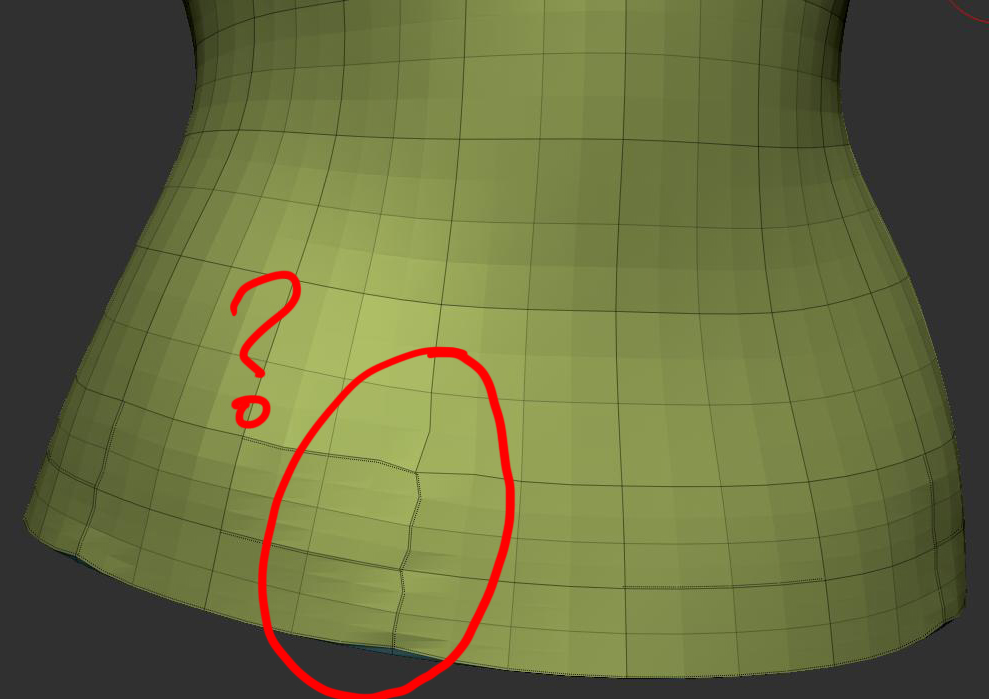
Did a retop using the Zspheres and then an extraction of the sub-tool for thickness and got this when subdividing. Any idea whats going on?
Hey there,
did you ctrl+shift+a (clear mask) before subdividing the extraction? ZB tends to put masks on the extractions. So just clear the mask and try subdividing again.
Hope that helps.
Good suggestion but I tried doing that and it still skewed the model. I was able to work around this though. I exported and then reimported an .obj of the file and it subdivides with out a problem. It would still be helpful if anyone has the solution on why this happens, instead of jumping through one extra hoop. I think its when I do the extraction, I really don’t have a clue.
To me it looks like you have overlapping faces …
well I do have overlapping geometry because I extracted the model to get a thickness. That could be where the issue resided because I grouped the sub groups when I exported/imported as an obj back into Zb and it was fine afterwards. Thanks for the input.
You’ve got some creases just there. They show with the dotted lines. Shift+click the Geometry>Uncrease button to remove them.
lol marcus eagle-eye cherry-civic 
I’ve creases at the corners of my eyes which is why I notice these things! 
Woah nice that was the problem. I was wondering what those were.Thanks a bunch.
and lol @ the eagle-eye comment