I’ve got a Ztool character that has a few verts that will not scale at the same rate as the rest of the Ztool in Zbrush. When initially creating the low poly model in Maya I made sure poly cleanup issues were tested like lamina faces, faces with more that four sides etc. My settings during that cleanup test were basically all set to a tolerance level of zero which SHOULD be the best setting…right?
I could be wrong but it sounds like those vertices might be masked in ZBrush. Try pressing Tool > Masking > Clear (shortcut CTRL + ALT + ‘A’) to clear masking and move those vertices again.
Neither the polygon layout nor the polygon construction (tri/quad/ngon) will affect modeling in ZBrush as 1) all imported polygons will end up tris or quads in ZBrush and 2) ZBrush modeling does not operate on the polygon construct. Modeling is based solely on the vertices.
Yeah thats something I checked. Its been a problem with the ztool throughout a number of saved versions, IT HAUNTS ME!!
Heres what I think the problem is with this ballooning issue, I created this ztool character at a VERY large scale, like REDICULOUSLY large. When I scale it down to a reasonable size in the lowest subdivision it looks normal. But if I THEN move up to a higher subdivision it all of the sudden balloons into a horrific looking elephant man!! It looks to me like an amplified displacement map that I was messing with before. How can I get rid of that effect? I checked the displacement options and nothing was enabled.
Sorry to be beating a dead horse ( it may come back to life though ;)), but could you please go to your highest subdivision level and clear the mask with Tool > Masking > Clear (CTRL + SHIFT + A). I think I found a bug in the clear mask function and it all plays well with what you are experiencing.
Masks that are applied at a higher subdivision level and which are completely contained within a polygon(s) of a lower subdivision level are not cleared with clear mask. This only applies when clearing from subdivision level X -2, compared to subdivision level X where the mask was applied.
Look at the following example:
-
At subdivision level 1 there are 4 polygons.
-
At subdivision level 5 I apply a mask which fits inside each of the 4 polygons of subdivision level 1.
-
After clearing the mask at subdivision level 1 and returning to subdivision level 5, sculpting shows the mask is still there. Turning on Tool > Masking > ViewMask shows the exact same mask as was originally applied.
[[attach=183338]ZBrush_ClearMaskBug.jpg[/attach]]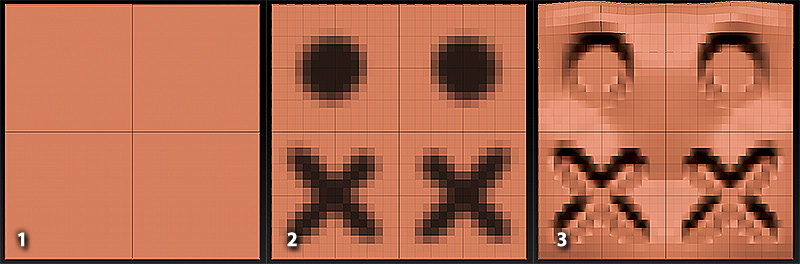
The difference in subdivision levels is not important. As long as the mask applied at subdivision level X fits within the polygons of subdivision level X - 2 and the mask is cleared at that level, that part of the mask is not cleared…
You are right in using a model with a scale that is not to large nor to small. At least that was the case with zbrush 3.1 (PC). With 3.5 (PC) and 3.2 (MAC) I believe an imported model is scaled to ZBrush units. Don’t take my word for it though. Always check the Tool > Preview > Object Preview window to make sure your model is not humongous or itsy-bitsy tiny. Well at least until you have a good import export workflow going.
I think your right. Strange it was happening when I open up the tool though. I thought masks cleared once you re opened the tool they were applied to. Your help is MUCH appreciated. Thanks!