I’m new to Zbrush and have been watching and reading as many tuts as I can to figure the maya->zbrush->maya process. My question is: how do you import the UV layouts, created in maya, into zbrush? When I use the goZ or export as .obj, and import into Zbrush, do my sculpting, and then when I want to create my norm and displace maps, it always says you need to create UV’s first… From all the tuts I’ve seen, it never mentions how it’s done, they just automatically do it and it seems there isn’t an error message saying you need to create the UV’s first when they do it. It just automatically keeps the maya UV layout and it seems so simple. Is there something I need to enable that allows you to always use imported UV’s in like preferences or something, or a setting in the UV Map window in the Tool window on the right? I’m spending way too much time figuring this out and searching for an answer cuz i’d rather use my resources before I bug other people with my probs. So, hopefully someone here can help. Thanks for your time.
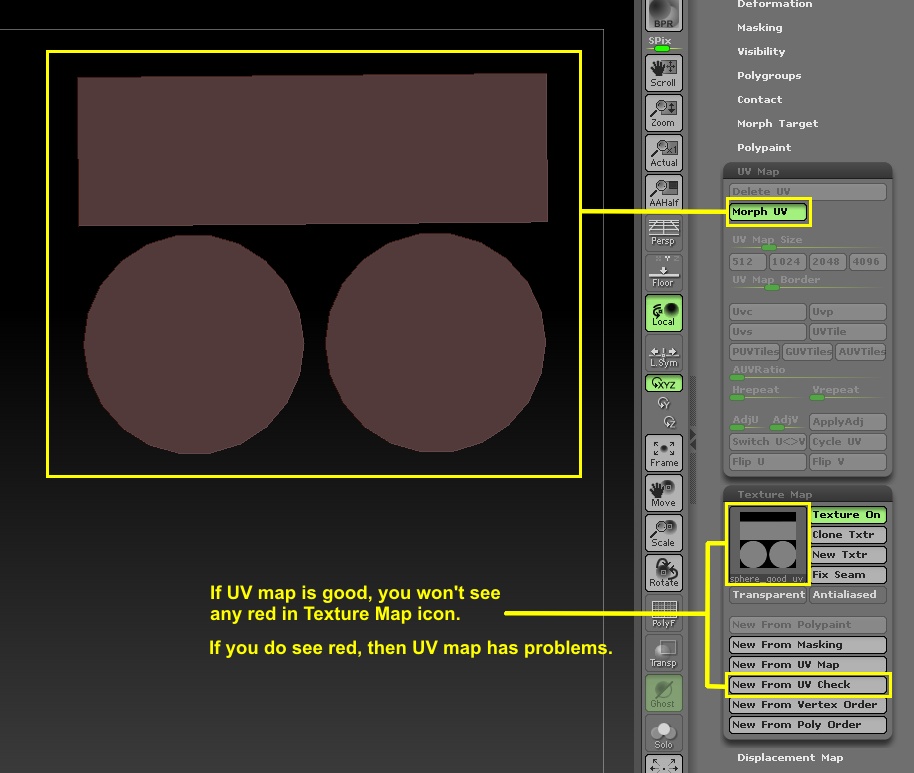
If you create the UV map for your object in Maya and you then export that object out as a Wavefront OBJ, then the UV map will go along with it. If that is not happening, then you should check your export settings in Maya for Wavefront OBJ. I don’t have Maya, so I can’t tell you exactly how to do that. You might have an option to export with or without a UV Map. There are a couple of ways you can check in ZBrush for a UV map. One is ‘Morph UV’ button and the other is ‘New From UV Check’ button. See image below.
thank you! i will get right on it and check that out… i think i still have some patches of hair i can comb over left… :lol: