ZBrushCentral

uv regions

Does anyone know of a good tutorial for managing multiple uv regions? I have a flower that I made in Maya 2011 and want to texture in zbrush. the flower basically has 3 parts to it, the stem, petals and leaves. Each part has it’s own uv set. For example, I created the petal, laid out the uvs and then made instances of the petals and rotated them around the stem to complete the flower. The same process was done with the leaves. I’m not real sure the best way to export the model and then texture paint in zbrush.

The uv sets I made in maya are pretty basic and was really wanting to use the uv master plugin to get a good uv distribution. I don’t know how to achieve this in zbrush either because it seems like zbrush wants to treat the whole object as one large uv set instead of each petal using the same uv set like it would in maya because they were instanced.

Thanks in advance for any help!

Hi,

Did you try GoZ for exporting your model from Maya? I work with Max, but I’m sure it work the same way with Maya. I’m a beginner though, so don’t take it as the final truth :smiley:

you can make the object bake each UV region by breaking the object into polygroups for each UV region. Assuming that you’re using (0,0-1,1), (1,0-2,1), etc. If you simply have each uv shell set within 0,0-1,1 you’ll have to break them apart by hand.

I’ve heard that z4 can do this automatically (bake different UV regions) but I have not had any chance to test it yet.

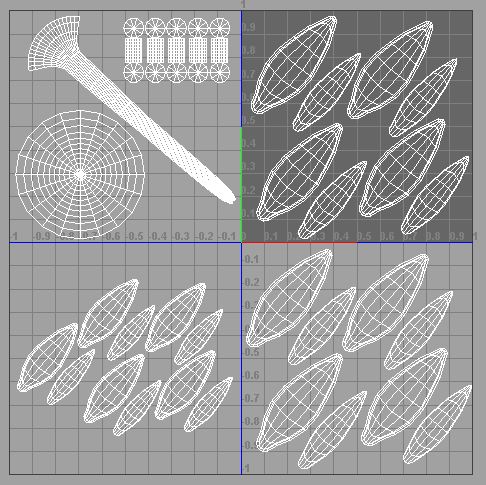
okay, so here are my uv’s in the different regions. I was able to get zbrush to export a different texture for each region, however I don’t know how to go about applying the four different textures back inside of maya. It seems that I can only apply different textures to different uv maps via the UV linking in the relationships editor. This would work fine, however it doesn’t seem that zbrush likes dealing with multiple uv maps for one object. If I separate them out into 4 different uv maps all in the same 0-1 space, zbrush won’t import the .obj or able to transfer it via GoZ.

If I set up my uvs as you see in the screen shot, zbrush handles it, but how do you set it all up back in Maya? Thanks for any help[uv_regions.JPG[/ATT]%3Cbr%20/%3E%0A%3Cbr%20/%3E%0A%3C/font%3E"] ](http://%3Cfont%20color=%22#9A9A9A%22%3E[ATT=221883)

http://www.zbrushcentral.com/attachment.php?attachmentid=221883&stc=1

Attachments

uv_regions.JPG

maya=no clue to me. Max, XSI, and Modo here.