ZBrushCentral

UV over normal map

Hi!

We work on an animated movie in Budapest, and most of the characters are made with zbrush. We use normal maps from Z-mapper.
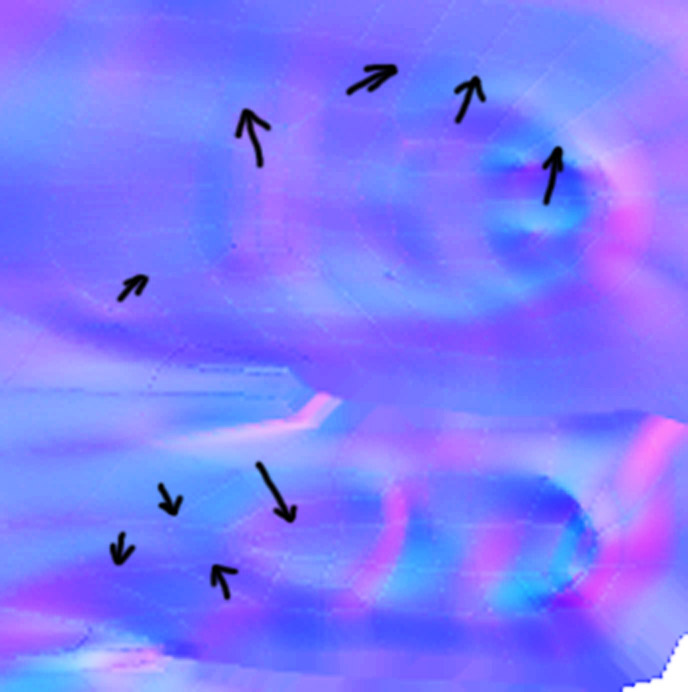
There is a problem with them. The UW-s are burnt in the normal maps. You can see the problem on the pictures above. I raised the contrast of the upper image a bit to see the lines better. Can anyone tell me how to solve the problem? Currently we paint it out in photoshop, but I hope there is a way to make clear normal maps. :o

[![UV_problem1.jpg|344x346](upload://23fvJ0c0rlbgVfKy2M3EBjpheiI.jpeg)]![zbrush02.jpg|344x346](upload://dsfBeZU8SpjIymOxMPkFzp7Nbu.jpeg)

Thanks in advance!

Mik

I’m sorry; I really don’t see what you mean.

However, could you describe the steps that you’re following in ZBrush? The settings that you’re using in ZMapper? The software used to make the UV’s and to finally animate/render the model?

Hi Aurick!

Here is a bigger and more contrasted picture. I hope it is better than the previous one.

I mean the brighter lines, where the UV lines should be. These are smoothed modells, so there is no reason to change the color of the normal map.

[UV_problem2.jpg]

I’ll screen capture the settings of Zmapper in few hours, when I finish my current task. We use Maya to create UV and base mesh, and Mr to render.

Thank you very much!

M