ZBrushCentral

UV mapping / col to texture

I use zbrush 3.1 and want to render in V-ray for Rhino. I am very new to uv mapping and polypainting etc.

I have a question about how it works. I’m doing a simple test just to see if I can get it to work. AUVtiles works well in zbrush but V-ray for Rhino doesn’t have that option (that I know of). If I use any other uv mapping (uvs, uvc, uvp) which are used in V-ray I can’t seem to get it to work right.

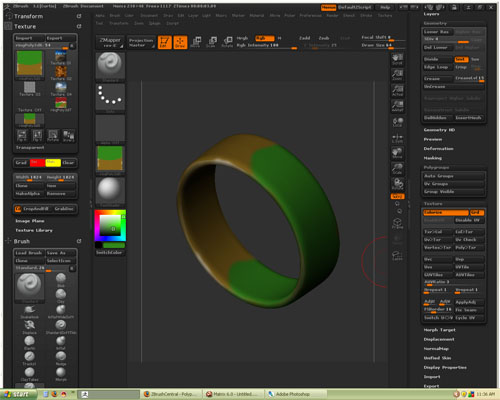
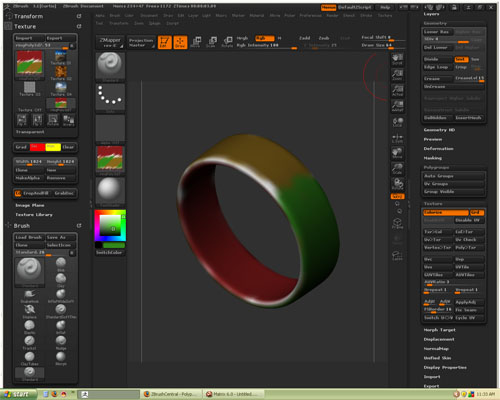
In the first image it shows the AUV tiles that works, but I can’t use. The second image creates a texture that uses the uvp method. How can I get the texture to map correctly in Zbrush? I have also tried the free version of the uvmapper to assign one of those methods to map it, but the same thing happens. Again, I am new so I know there may be a simple answer, but any help would be appreciated.

Attachments
test1.jpg

this is the second image

Attachments

test2.jpg

if for example this ring has only 1 uv group, how can I change them into multiple groups in order to separate the sides from the outside and inside of the ring? Are the uv groups different from the polygroups?

so whats the question < dude?

Use AUVTiles or GUVTiles - inside Zbrush or…use external UV editor…google them …ull find plenty. And read FAQ and Tutorials before asking questions…use SEARCH to find similar problem on the forum that been solved, so…luck )

Sorry for not knowing as much as you. I have searched the forums, the net and I have read a lot about it. I still haven’t been able to figure out (for example) how to map the texture correctly using (for example uvp) as in example picture #1. I would not have asked if I did not already research it and try to figure it out myself. I have spent many days and hours on just figuring all this out. I can’t find the answer even after all the reading and researching. It hasn’t clicked for me yet so don’t shoot me down for that. I am a beginner.

As you can see in the Image #2 it doesn’t create or map the texture on the inside of the ring and it repeats or mirrors one side.

have u used Projection Master? describe ur process, we are not extrasense ones )

No, I’m just poly painting on the surface without projection master. This is just a slopy quick test just to see if I can get it right. I’m just poly painting it and then trying to use the col to texture option. I am experimenting with uv mapper right now to try and assign some new uv’s to it so that I don’t have to use the uvp, etc in zbrush. I have almost got it to work in zbursh, but then I’m going to have to figure it out for v-ray (to re wrap it to the surcace properley.

Thanks for replying.

Well, thanks for anyone that at least read this post. I have been struggling with this for quite a while, but I think I figured it out and this is what I did.

I am no pro at uv mapper, but I managed to use that program to tile the uv maps. I had to then re map the side differently. I stretched what was there to fill the whole texture area. Then I saved the model, imported it into zbrush and then did the quick polypaint test on all sides. Then I went straight to col>text and it worked pretty well (just a few visible seams on the sides). Then I flipped the texture vertically as suggested by someone of the forums (found doing research a while back) and then exported the texture. In V-ray I applied the texture to the diffuse layer on a matrieal and rendered. It all rendered correctly.

My problem was the uv’s. The uvs,uvc and uvp didn’t fit the model properley, but once the uv’s were redone in uv mapper I finally got it to work right. A more complex object might be a bit harder to do though.