ZBrushCentral

uv look fine, but texture "smears"

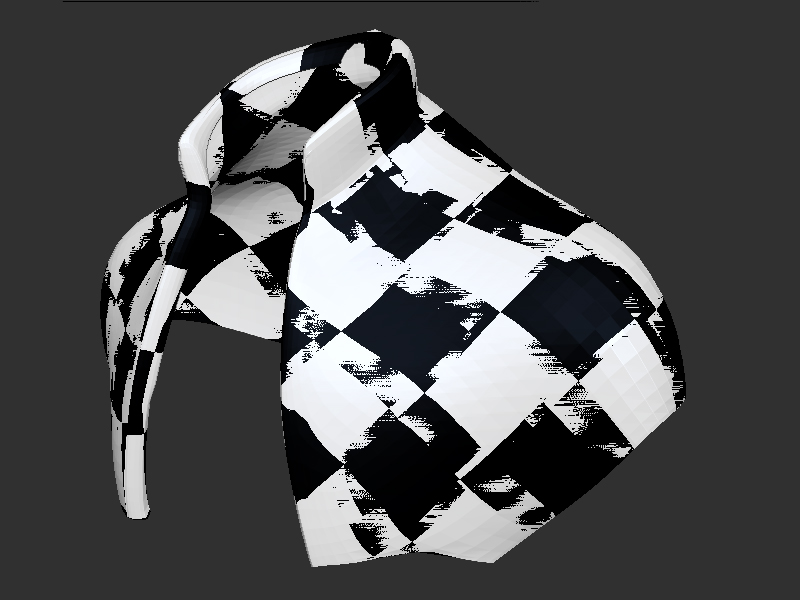
i have used uv master to create uv for this jacket. and despite i did like always ( meaning i just hit “use clone, unwrap,copy uv, and paste them to the original mesh”) i get the texture smearing as one can see best with the checker board texture. when flattening the uv to see how they look it looks great … why is the texture smearing ? and, how can i repair it ? (redoing the uv makes same issue, so that is no solution…)

Attachments
problem.jpg

It looks like there are two objects/polygons fighting for the same space. Is there a duplicate subtool (perhaps the clone you made)?

i just checked. no, there is no duplicate of the mesh. its just this mesh with nice uv, and smear texture… thanks for reply :slight_smile:

That looks like two overlapping objects with different uv mapping to me. Can you export it and look at it in a seperate modelling app, like modo, mx, or lightwave?

yes, i can, gareee, exported to blender, it looks same :frowning:

problem2.jpg

It still looks like somehow there are two versions of the mesh overlapping. Can you tell how many polys there should be, and how many there actually are?

You might be able to somehow select the “ghost” duplicate mesh and delete it, cleaning the object up for use.

ok, you are right… i cannot tell about the polycount, (still very new to blender) but now i zoomed in so closely that one polygon fills the screen, and i can see double vertices and edges… have no idea how to select them (if not doing one by one)…so, best will be to retopo the whole thing… thanks a lot, gareee. it is good to know where the error was. i must have made something strange when mirroring… thanks again, i appreciate your help very much :slight_smile:

Not a problem… I had JUST done something like that myself yesterday, and corrected it today.

Instead of retopo, try to select one polygon if you can, and then select anything connected to it… it’ll probably select the entire ghost group.

Delete that, and you’ll end up with your object uv mapped and topo’d.

Did you use dynamesh for this project? That’s one way I know of where you can get two similar objects merged into one. It happens if your mesh already has subdivision levels prior to pressing the dynamesh button (and then subdivide the dynamesh as well possibly). Once you leave dynamesh mode, the original mesh prior to converting to dynamesh appears and merges with the one you’ve just turned dynamesh off for (and will be masked too). I honestly don’t think there is a fix for that, other than not having any subdivision levels prior to entering dynamesh mode next time you do it. Turning the dynamesh button on and then off again might be one way to fix it if this was a dynameshed project. It certainly would require a bit of experimenting to know for sure.

garee, thanks again… i tried this, but my mesh is not a separate ghost, its all one mesh as i see when i select linked vertices… anyway, i quickly retopoed the thing, and now all is fine…

zeddicus, yes, i first made a dynamesh to get the approximate shape, but there were no subdivision involved in that. and then retopo the jacket over the dynamesh. but, i have still the dynamesh separate from the jacket… i must have made something other wrong, , (heck, my editor window for writing the message is dark brown background, the fonts are black, its almost impossible to see what i type…lol…sorry therefore for typos) thanks for feedback

I’m seeing the funky black text on dark gray background as well… must be an issue with zbrush’s forums today. Higlhlight your reply to make it easier to read before posting.

Yeah it pretty much only happens if you say yes when asked if you want to freeze subdivision levels upon pressing the dynamesh button (a second press will be needed to actually enter dm mode with this method). When your finished sculpting and choose to leave dynamesh mode, ZBrush will project the details of one onto the other and sometimes the result is terrible. The parts of the mesh as it was prior to entering dynamesh mode will be automatically masked when it completes (don’t know why, it just does).

It’s worth noting for everyones benefit that if you’ve chosen the Always YES option at some point prior to pressing the dynamesh button and your current mesh already has subd levels, ZBrush will no longer prompt you about freezing subd levels. It will just do it. Something to keep in mind when using dynamesh in the future.

If you say no when asked about freezing, ZBrush just deletes all subd levels other than the one your currently on and this avoids the problem entirely when you decide to leave dynamesh mode at a later point.

I hope you figure out the culprit. Like others have said, it really does look like two overlapping meshes that are very close to identical shape-wise.