@Zigglywo so good you made a video.
Regarding the Wacom pressure issue with Wine Zbrush I have some additional information.
First, I’ve tried many ways to (properly) remove the issue, however my attempts failed. I guess there is something wrong with how Linux currently by default interpret the Wacom pressure. It could also be something in Wine related with Wacom.
With the below configuration that solves the issue in Wine ZBrush, I did a comparison test with Wine Photoshop CS5 (trial). My Wacom lines did not update when pressing, causing only straight lines. The Surface pen did update but without any pressure. This show that when using Wine a tablets functions seem to be somehow app specific. When using Linux with Wine, just because it works in one app does not mean it works in another.
At the same time when using ZBrush the pressure issue is removed with both the Surface tablet and with Wacom when using Turbovnc with the below argument.
As mentioned I am currently using a VNC connection to my workstation. To start the vncserver I use the following command:
/opt/TurboVNC/bin/vncserver -localhost -virtualtablet :1
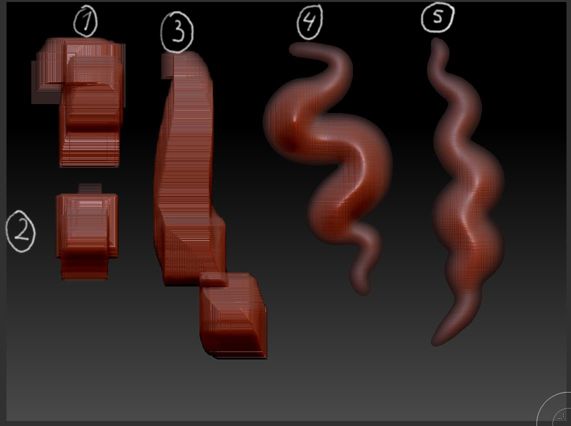
The argument “virtualtablet” will modify how the tablet functions. Now, when running ZBrush I get the result as in the attached image.
The first two strokes will have the issue present (1-2), but soon it will be gone (3-5).
However, I guess this does not “solve” much for you if you use a Wacom, a proper solution might be increased features in the Wacom configuration tools available for Linux. For example one attempt could be to try and map the pressure to something else than 0-2047, for example half or double.


