ZBrushCentral

Using Transpose results in spikes on one half of the model

Hi,

This is for ZBrush 4R6 on MAC.

Everytime I have a model in symmetry mode and I try to use either the Move Transpose or the Rotate Transpose tool, I get these spikes on one half of my model. There are no polygones selected. Where do these come from?

Attachments

Transpose.jpg

It looks like you might have some masking on the subtool. Go to ‘Tool > Masking’ and click ‘Clear’ or ‘Cmd+drag’ on canvas.

No, I don’t. This is the default Sphere from Lightbox. I just dragged it on the canvas and immediately used the Transpose tool. But just as a side note, if I DO mask off some parts of the mesh, I get the same strange result in the parts which were not masked.

I’m on PC and I don’t get the same thing, as you can see in the image. Maybe it’s just a Mac issue. Marcus is a moderator on this forum and I believe he is on a Mac so he might be able to help you. If nobody replies within the next 24 hours, I would suggest you submit a Support ticket.

new-2.JPG

Yeah, I will submit a support ticket tomorrow. I just wanted to see if others have the same issue/problem.

Which tool/project is it exactly in Lightbox, by name? There are a number of spheres. Do you have this problem with any other mesh? I wouldn’t submit a support ticket unless it’s a persistent problem in your program operation, and not just one particular mesh that might be problematic.

As previously mentioned, make certain any masking is cleared. Even if not visible, manually clear it. Occasionally, an object can inadvertently become partially masked. Having symmetry active can also make for odd distortion at times when transposing, depending on what you are trying to do, and whether the areas of influence are overlapping in a conflicting manner.
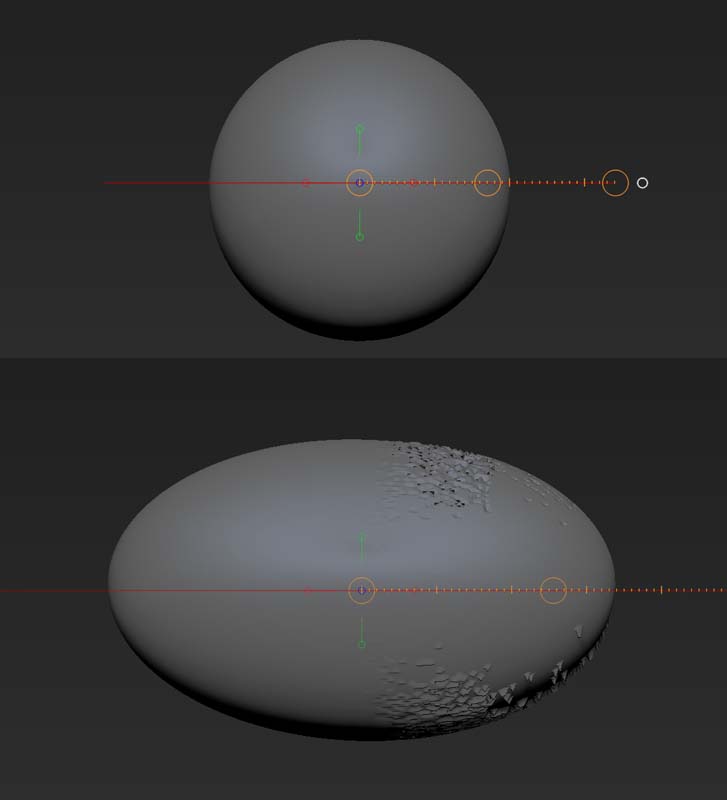
I’m on Mac OSX 10.8.5 Zbrush 4R6P2 and I tried this and didn’t have any issues.