Hi everyone. I hope I am posting this in the right place.
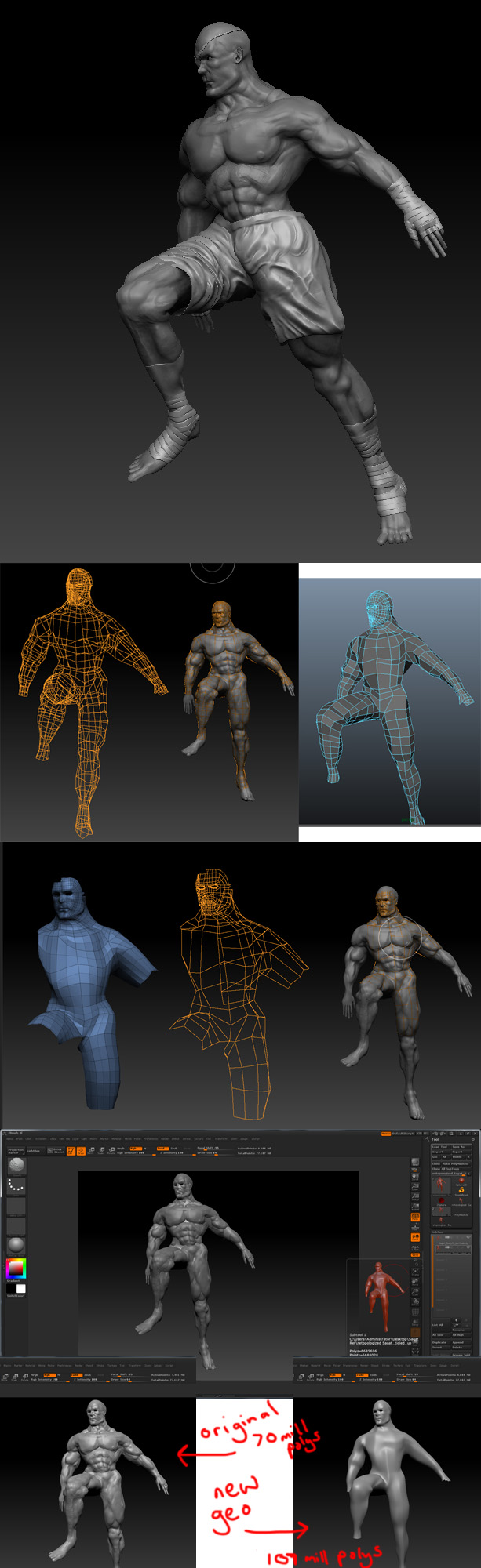
I have been working on a model of Sagat from Street Fighter 2, and have got to a point where I want to transfer the details from the high level sculpt onto a more ordered lower resolution mush. Using an appended zsphere, I made my lower resolution mesh, and then cleaned it up a little bit in Maya. Now having gone back into Zbrush, I have taken the original high level mesh, appended the new lower res one to it, and have tried to use the project all button to transfer the detail. But I am having no joy at all, and wanted to ask a couple of questions.
1.) I understand I need to divide the new low res mesh to the point where it has at least as many polys as the high level. My high level mesh, at its peak was approx 4 million polys but I divided it twice more in the HD geometry palette, so i assume I need to do likewise with the lower resolution mesh?
2.) When I was sculpting the original figure, I used transpose master to pose the character. But I lost my lower sub div levels. Whether I forgot to hit the button to do this or I was just unable to I cant remember, but my point being that, although the high level mesh had 4.5 million polys (not counting the HD Geometry) it only had two levels of subdivision in the standard geometry palette. Does this matter, when to get to the same polycount with my new mesh I have to subdivide seven times in the same palette?
3.) When I think I have everything set up properly, with the new geometry appended as a subtool, and subdivided enough e.t.c, when I click project all, it is taking ages…I mean like, after half an hour or so, the orange timer bar appears at the time and the countdown has some huge figure in it which equates to about 10 days worth of computing time. This cant be right can it? IS this because of the HD geometry?
4.) I decided to leave the hands and feet off the new geometry. I understand this could cause some issues in those areas but it doesnt make it impossible does it? This is the first time Ive attempted this process…
I shall attach some images which hopefully illustrate things a little better.
Attachments