Hi, i am modeling a mountain and i have the model at about 500.000 polys But when i put a jpeg alpha map i made from a photo in photoshop it doesnt come out good quality. Is this just b/c my model isnt high enough?
Could you describe your steps and show what’s happening?
Hi,
yeah here u go.
-
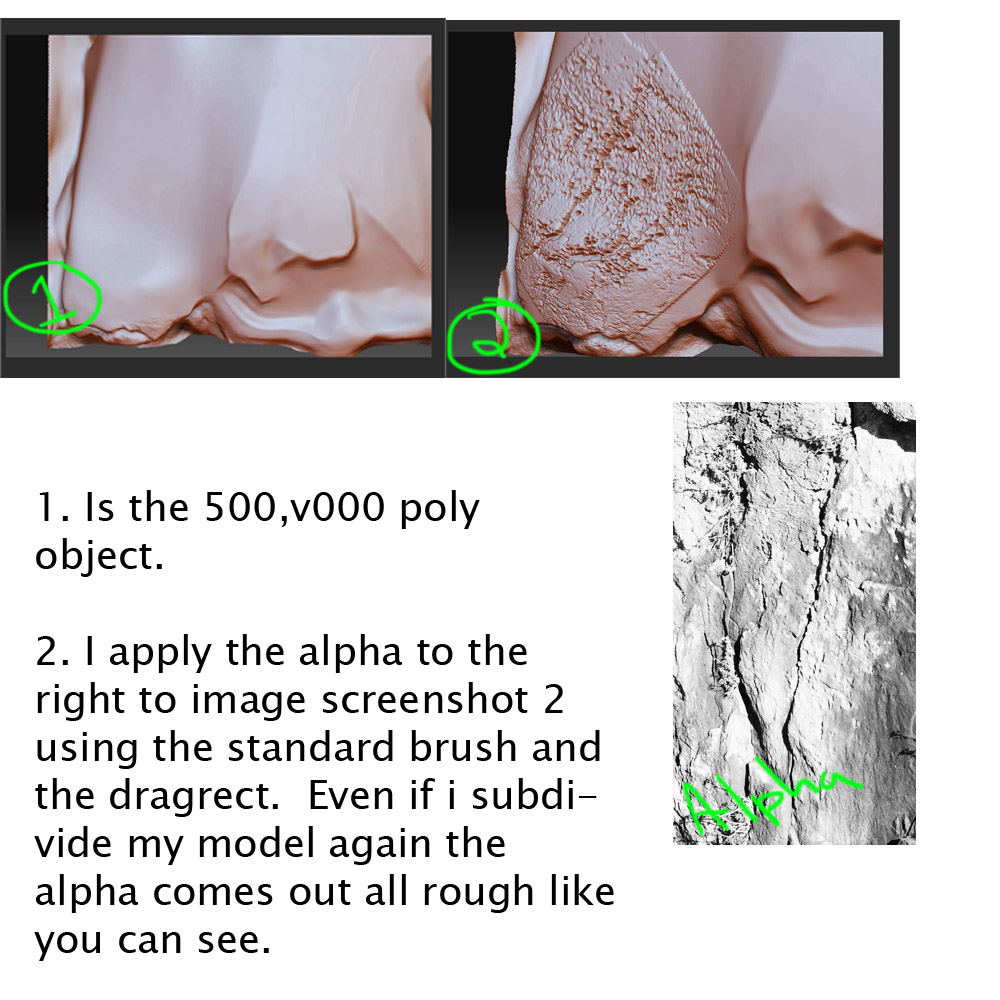
Is the 500,v000 poly object.
-
I apply the alpha to the right to image screenshot 2 using the standard brush and the dragrect. Even if i subdivide my model again the alpha comes out all rough like you can see.
Attachments
does anyone know what i’m doing wrong 
Actually what brush is best to use dragRect with an BrushAlpha? A friend helped me and we worked out my mesh is to low res
What your illustration shows is exactly what I’d expect to see with a photographic alpha.
The thing you have to remember about photographs is that they contain NO depth data. Zip. Zero. Zilch.  They contain light and shadow data. That’s something quite different.
Our brains know what we’re looking at and convert the light and shadow data to perceived depth. For example, if you look at a photograph of a face you see where the eyes are and you know that they’re recessed while the nose comes forward. But a computer doesn’t have that brain that can use real-world experience to interpret the photograph. All it can do is go with the literal data that the photo has, which is light and shadow that – although caused by the depth in the source object – does not precisely mirror that depth.
Your alpha has a lot of roughness to it. The result is that your sculpt does as well. The trick with alphas is to forget what you know about them (for example, this is a photo of a rock) and only consider the actual grayscale values.
ok cheers Aurick i’ll try making my own brushes or getting some high res ones. Whats the best brush to apple the alpha/s with? stardard? clay? etc