ZBrushCentral

Upgraded to 4, still problems with snakehook. [Answered]

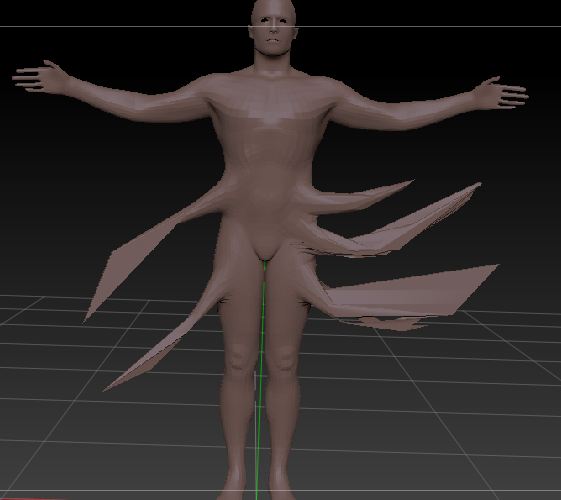
So I took you guy’s advice and did the free upgrade to 4, hoping it would fix my problem. It did fix some of them and I’ve been playing with the new move brushes all morning. lol I had my fingers crossed that it would fix the problem with my snakehook brush ,but the issues are still there. I thought maybe using the lazy mouse would help with them but it only helped if I dragged a very short distance. Here’s the result:

The shattering seems to be better if I do very short pulls (wheras in 3.5 it did it nomatter what) but this is driving me crazy. Someone please help. (Computer specs: Windows 7 64bit, 3 GB ram, Intel® G41 express chipset, Zbrush 4 R2)

Attachments
snakehookshatter2.JPG

When you pull out the geometry too far the polygons of your mesh are getting bigger and bigger. Click on the polyframe button on the right side of your viewport to see whats goin on. You could change your mesh resolution to a higher level or use dymamesh to get better results. I suggest to buy a book and watch some tutorial videos to learn some basics of 3d modelling.

Thank you. :slight_smile: I’ll do that.

Dynamesh is a real life-saver with this sort of work. It is precisely designed so that you can explore the form of your sculpt in a completely free way (though note that it is for low to medium density work, not high detail). You can read more about Dynamesh here:
http://www.pixologic.com/docs/index.php/Dynamesh

Yes! Thank you. Dynamesh fixes everything. I knew it was probably just something I was overlooking. Much appreciated.

I’ve been playing with the snakehook brush as a possibility for creating quick and easy vines, and one thing I discovered is that if you’re not careful, polygons can become stranded in space when you remesh something that has become very pointed. The way I found around this is to use the inflat brush on the problem area prior to remeshing. It does take some finesse though as you can potentially cause flattening and/or lumpiness this way. A blurred mask combined with the inflate deformation slider also works fairly well. If you already have polys stranded, just hide them and press the delete hidden button. Just thought I’d throw that out there. :wink: