ZBrushCentral

Unwanted surface noise when moving between subdivision levels

Hi.

Here’s some problem I’ve been having for a time. Every now and then, the model seems to become “corrupt” and starts generating some unwanted noise when moving between surfaces. It would only be midly annoying if it wasn’t for the fact that as you keep modeling and moving up and down between subdivisions, it continues to appear in new zones.

Probable reasons for this (since they match every model where it has happened) could be:

  • Rescaling it significantly within Zbrush
  • Fixing a misplaced symmetry axis in Max and returning.
  • Fixing topology in Max.

Any ideas on how to fix it?

Thanks in advance.

Attachments
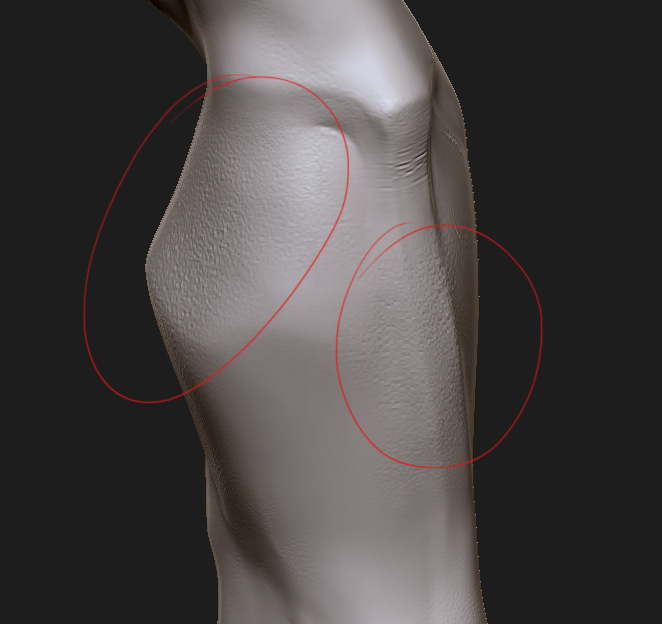
noised.jpg

scale change will cause this. make sure you model fits within the tool.preview window. This will tell you that the mesh is the correct scale to work inside of zbrush.

to fix this you can delete all lower subD levels and reconstruct your lower subD levels. This should throw out any information on the mesh that was retained during another edit that you performed.

Thanks a lot. This was very useful :slight_smile:

How do you get a mesh with multiple subtools to fit neatly inside the preview window? I tried polygroups > merge > set pivot, subtool master > scale, and scaling everything down in 3ds max then bringing back to zbrush > set pivot, and none of it worked.

NVM, figured it out. Had to export everything, then re import it.