ZBrushCentral

Unwanted artifacts popping up

Hi Folks,
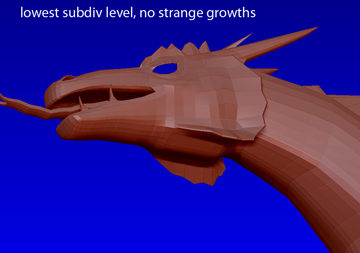
I am getting unwanted geometry artifacts popping out from my mesh as I increase my subdivision levels. At subdivision level 1 everything is as it should be, but the artifacts start showing up in increasing size as I go up the subdiv levels. The base model was modeled in 3DSMax and exported as an OBJ for ZBrush. I cannot get delete these extra polys in ZBrush and they do not show up in Max. I would appreciate any help that I could get on this. I am attaching two inmages to illustrate the issue.
Thanks in advance,
Alan

Attachments
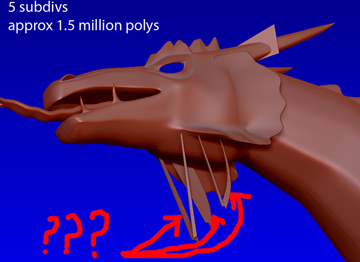
ZTool with growths.jpg

ZTool without growths.jpg

how large is your model?
does it fit within the tool>preview window?

Hi Yeti,
the preview shows the whole object.
Thanks,
Alan

Do you have poles where those verts are coming from?

I create my meshes in c4d and goz into zbrush. Sometimes I forget to clear the mask and start moving my brush around before I realize the tool is masked 99.9% on import and a few points will fly out , For some reason the edges sometimes are unmasked in a few small areas , definitly after taking a mesh into c4d and adding a couple of loops to the geometry, and reimporting .Sometimes I can zoom in and smooth the points out! Sometimes I goz back to c4d and move the points back to where they belong! Sometimes I delete my upper levels of gemometry! Back to 1 and re subdivide! Am careful now to clear the mask!when I take a tool into c4d add polys and bring back in!Not sure about MAx, worked with it a little years ago seems like a poly is a poly and a vert is a vert! Hope this Helps, DJ

Hi Folks,
thanks for the responses. I do not have poles at the affected areas. I was not aware that on re-importation through GoZ that the mesh was masked. I will have to check that one next time. I imported an earlier iteration of the model and have had no problems since, thank God for incremental saves.
All the best,
Alan