ZBrushCentral

unusual brush behaviour

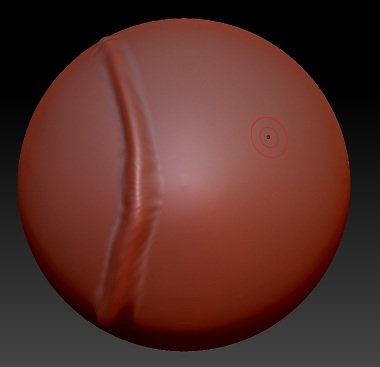
I’m total Zbrush newbie so I must be missing somethingon a regular zsphere I used a basic brush and I got this

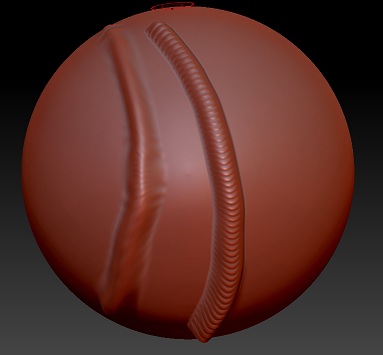
then when I increased subdivision level I got smoother look

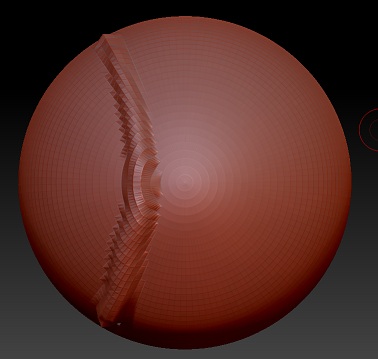
but when I used the same brush with same setting instead of getting same smooth pattern like in the right i get some kind of pattern trail like that it like I’m placing dots right next to each other why is that ?

is there fix?

Attachments
Ze1.jpg

Ze2.jpg

Ze3.jpg

Probably there is the Lazy mouse active and with a step value of 0.25 You can try to decrease in Stroke/LazyMouse/LazyStep.
Also you can try to Increase the LazyRadius to something more comfortable for you.
Another thing you could find usefull is that you can just deactivate lazyMouse by pressing L Hotkey.

I have to say i don´t like the default stroke for the standard Brush in last releases. So i tweak it a bit in the Stroke palette as i mentioned above :rolleyes:

Look in the Stroke pallette. See also http://docs.pixologic.com/user-guide/3d-modeling/sculpting/

@][-][4Z4R][))
Wow! that was quick and accurate thanks man :slight_smile:
@Doug Jones
that’s very informative! I’ll keep that in mind (or in my bookmarks :smiley: ) for future thank you :slight_smile:

glad to help :+1: