ZBrushCentral

Unknown hotkey setting

Ive run into this problem a ton of times, without actually being able to clarify why my pen started acting weird. Its something my computer does, as it works fine when I switch tablets. Im hoping its a hotkey in Z brush I was unaware of.

Basically I just want to use a normal brush without it changing pressure/Z intensity/Draw size or whatever it is that it seems to be doing. How do I change this setting back to normal? If I restart Zbrush itll pop up within 10 minutes, so I need to know which setting it is that keeps getting activated.

As you can see in the cube, I just draw ONE line down, and it changes (quite unvoluntarily from my part), and switches variables in EVERY stroke.

This has actually bugged me for YEARS. I hope youre able to help me out!

Thank you in advance!

Attachments
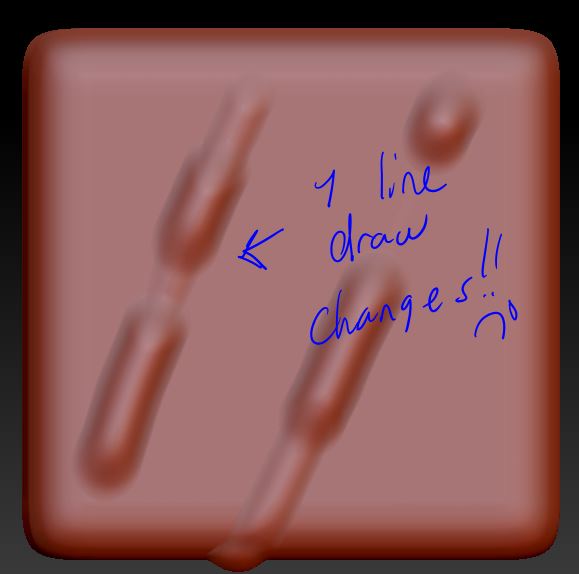
what ze hell.JPG

What tablet are you using? Do you have the latest drivers?

I am currently running WacomTablet_6.3.14-1.

Its the newest I could find.

But Im fairly sure its not a driver issue. Ive had a lot of drivers through the past few years and this problem still popped up now and then.

hmmm. You said it works fine when you switch tablets? Maybe it’s a hardware issue with one of your tablets? What tablet are you switching to?

My bad for bad explanation. It has the same problem when I switch tablets. So it has to be something in my computer.

Hmm. I can’t think of anything in zbrush that would be doing that. Maybe both of your tablets are messed up?

You could try fully uninstalling the drivers and re-install the latest ones.

Can you reproduce this issue with just a standard mouse when sculpting? Or does it only happen when you are using a wacom tablet?

Relevant question. ONLY when I use a tablet :slight_smile: Using a normal mouse it makes a regular stroke.

Heres another example. Using a single stroke with my cintiq.AnotherExample01.JPG

Ive seen a lot of cool Zbrush brush features, I am very convinced that its a setting somewhere I have to deactivate.

Reinstalling Zbrush hasnt worked for me. Reinstalling my driver hasnt done a thing either.

What brush are you using?

Does this happen with every brush?

Does this happen with the standard brush with reset settings? Brush > Reset All Brushes

Check to see that your “Stroke > Roll” is off

It does happen with every brush. Roll is off. Brushes are reset. Still doesnt fix it.

Does this happen to you when you use any other software? Mudbox, Photoshop?

Definitely seems like something is wrong with your wacom tablet if a fresh install of zbrush doesn’t fix it and the issue goes away when you use your mouse.

The problem goes away when I close Zbrush and reopen. The thing is that it keeps coming back, so Id love to know what setting is being changed so I can get rid of it. I cant even model for more than 10 minutes before it comes back and I Have to re open zbrush.

I dont seem to have that problem in Photoshop or any other program.

When the issue creeps up after 10 minutes of working, does it immediately go away if you switch to your mouse? If so, it seems like there must be a hardware or software issue with your wacom.

Maybe someone else can help further. But I’m not aware of any tablet specific settings in zbrush that would do what you are experiencing.

See also http://docs.pixologic.com/reference-guide/stroke/modifiers/
and the section on modifiers(there’s another one)