ZBrushCentral

Unified Mesh problem..

Hi there ive been using softimage for a good year now and finally decided to try using zbrush and have followed through every tutorial…=p
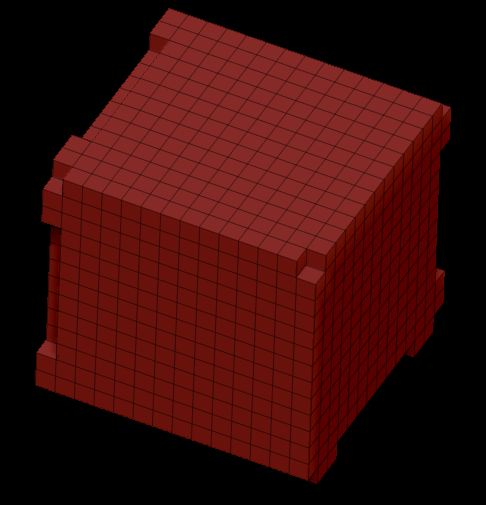
The problem im having is when you take a 3d cube or sphere and try to make unified skin. Everyy time i turn the smoothing down to 0 my remesh is coming out looking like it was piced together by lego…

There sqaure is missing cubes all along its edges and sphere is not a sphere any more its a lego ball…

So as an example in the first stage of the projection master tutorial where they set the initialized state sub d’s to 8(i can only go to 16 for some reason?) and smooth to 0 before they unify the skin. Then they unify it and get a perfect block with a proper mesh…as stated i get cubes all over the edges of the mesh missing…I can use the smoothing and get a rounded corner block but thats not what they did in the tutorial so im not sure what i may have missed. Any and all help would be nice =p…

As for that id have to say zbrush does some of the coolest things i think i have ever seen =p…great program…
Just use the PolyCube which is included with ZBrush 4R3. It’s the same thing you’d get the other way, but without having to use steps that no longer work due to changes in the program’s routines.

thanks.

Any thoughts to when this will get fixed? I was doing the Architectural videos in a ZB demo and it worked fine. Then I buy the program and it’s not working. I don’t mind since there is a work around, but when your following tutorials and you end up with something different your first instinct is, “What did I do wrong?”

Thanks,

Matt

ps- I may add that the demo was, R2 I think.

I just watched the video lessons http://www.pixologic.com/zclassroom/homeroom/lesson/transpose/#transpose-cable-creation-part-2 and it shows in the beginning of the video to do those steps and get a nice clean cube. When I follow the exact same steps as in the video (with zbrush 4r4) it does not give me those clean results and makes mine all lego like too. Just curious if have the same version as the person in the video, why mine doesn’t come out right. What am I missing.
unified skin.JPG

Be sure to turn the Cube into a Polymesh 3D first. If you just try and turn the primitive into a Unified skin, you’ll get an identical result to what you’re showing. If you convert it into a polymesh 3d however and then use that to create the skin, the result should be exactly like in the video.

Thanks, That was it. I was missing that step in the process. It works like it should.