ZBrushCentral

Uneven Modeling on X Axis -- What causes this?

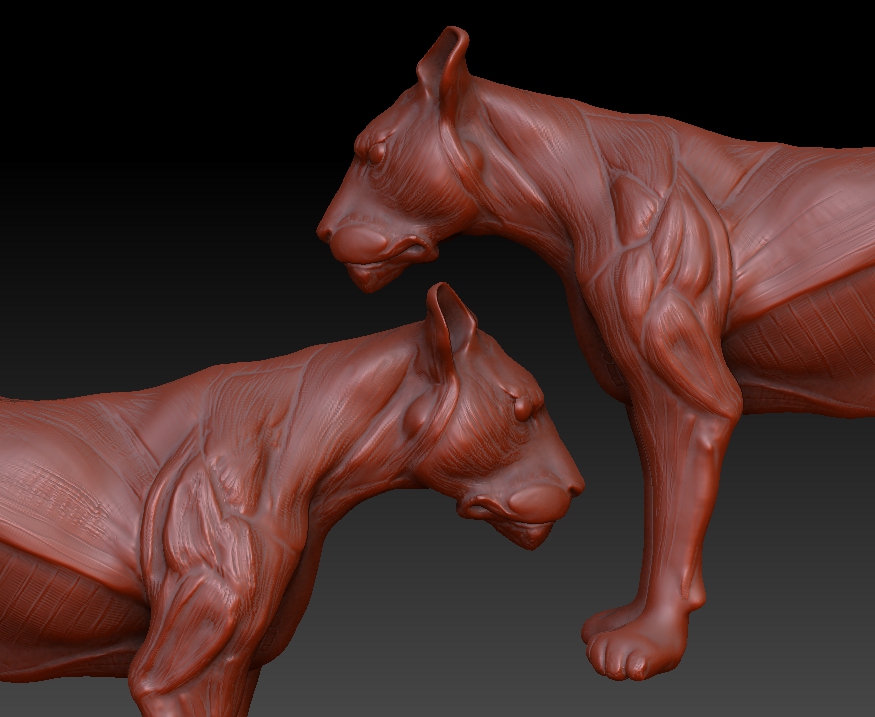
Can I save this sculpt, or must I use an earlier version and do the work again? On the Lion’s left side (screen right, lion’s left) it looks great. On her right side, not so great, not a mirror image. I’ve been trying to work from both sides, but the effects are uneven, as the screen left side is more greatly affected by the brush while screen right is not affected at all. Help!

Katherine Dewey

Attachments
WTF.jpg

By the looks of it, you must have moved the mesh off center at one point, losing X symmetry. If you havn’t posed the mesh and it is still supposed to be symmetrical then you can still fix it using ‘Mirror And Weld’ in ‘Geometry’ sub-palette on the X axis.

First, click ‘S.Pivot’ in the ‘Transform’ palette to center the pivot.

The way that ‘Mirror And Weld’ works is, anything on the left of the X axis (green line) will be mirrored over to the right side. The good side of the mesh has to be on the left. If it isn’t, then you can temporarily rotate it by entering 180 in the Rotate slider in Deformation sub-palette. Then click ‘Mirror And Weld’ with X axis selected on the button. When done, you can rotate it back 180.

Thank you! Assymetry was the problem, and your solution solved it. All I noticed was the inequality in modeling, not that symmetry was off.

You’re a good man for replying so promptly and describing the solution so clearly.

Katherine Dewey

Your welcome Katherine! :slight_smile: