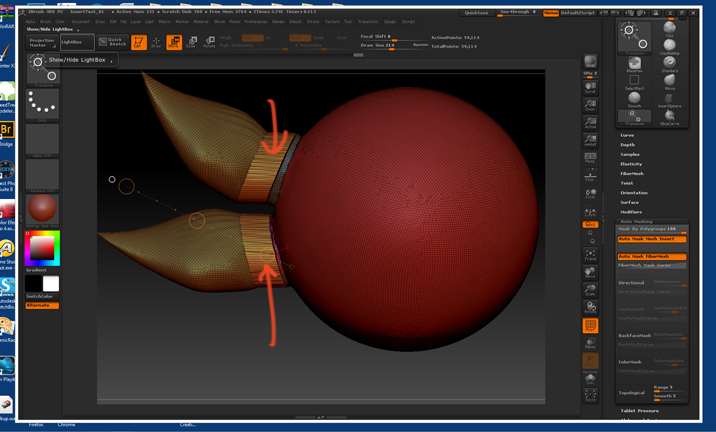
I am working in the Eric Keller book, Introducing ZBrush 3rd Edition. I am doing the exercise that shows how to use Dynamesh and the Group button to separate groups into separate objects.
It has me using the SliceCurve tool. I have Dynamesh turned on and my resolution is 128. I slice between the sphere and the two protrusions. Then I click on the Polish Button and the Group Button in the Dynamesh subpalette. Dynamesh is turned on. I then Ctrl+drag a small rectangle to activate Dynamesh.
It looks good…forming a smal seam between the two objects. But when I go to transpose>move and drag the protrusions away from the sphere…they do move away but are joined, as the attachment shows, and the polys are stretched. How do I cut clean though?
Not sure what I am doing wrong. I have tried the exercise a few times…all unsuccessful.
Thanks ahead for any tips or pointers as to where I might be flubbing up here.
Attachments