ZBrushCentral

Ugly pick-up in projection master

Hello Aurick and the pros…

I keep trying to use projection master and I get this wrong behavior from the software…

The preview looks good but when I pick it up I get this ugly mesh definition move… not at all matching the preview…

first I thought it was Antropus’s alpha 400X400 (not being a multiple of 256) to create this “free game” I did my version 512X512 in photoshop but it doesnt solve the problem…

Thanks for the help all!

Helios

Attachments
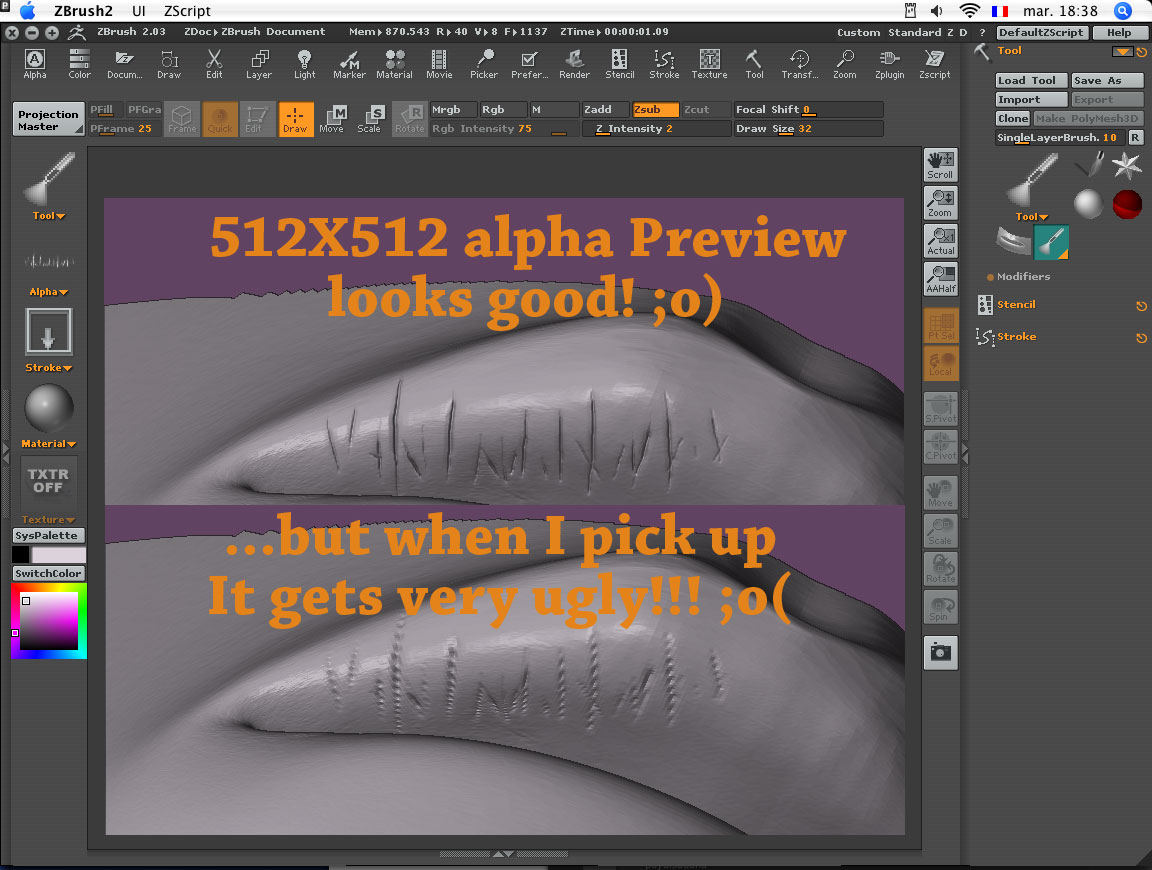
PMcrazy4.jpg

Your model doesn’t have enough polygons to support the fine details that you’re trying to sculpt. You will need to subdivide higher.

Hello Aurick,

many thanks for being so helpful and patient with beginners like me!
You were right but my overall poly is already to high and I end up with a model over 9 millions poly - fine result but too heavy for my system!

On thing that trick me is that I recall seeing some model with less poly looking sharper!!! Antropus’s picasso and some monster from a fake beginner on this forum 3 weeks ago! :lol:

what is their secret!!!?

Helios lips.jpg

It really depends.


  • The model may have less overall surface area. For example, a model of a head will have more polys per square inch than a model of a whole person.
  • They may not have sculpted everything. Some of what you see may be derived from bump mapping or good texturing.
  • They may have used HD sculpting.
  • They may have been more careful with polygon distribution, starting with a mesh that had more polygons where they knew they’d need lots of details and fewer polys in places that wouldn’t get much detail.
Regarding the first bullet point above, you can get more polygons into your model by splitting it into different subtools. For example, a mesh that is maxed out can be split into four parts and each part can then be divided again. Or you can split off 1/4 of the mesh and subdivide that one part again.