ZBrushCentral

Two simple questions. Answered.

Hello forum!

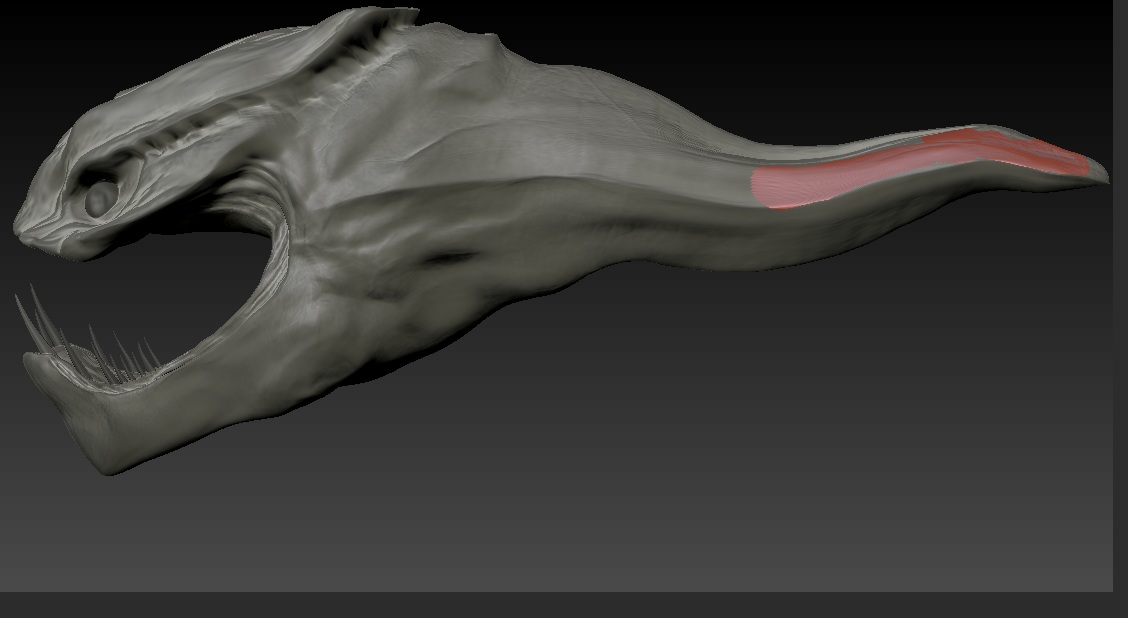
I am working on a sea-monster alien sculpt for a project. I have two problems that are hindering my ability to progress with the sculpt.

  1. I changed my sculpt to Green wax, but for some reason the tail area is still red wax. How do I fix this, and what causes this?

  2. I want to make an upper-row of teeth, but I can’t figure out how to rotate the bottom teeth properly. Is there any way to rotate a subtool 180 degrees?

Any help is appreciated, thanks!
[HR][/HR]

Attachments
siderev1.jpg

  1. Somewhere along the line you painted on the other material. To fix it, Turn on ‘Mrgb’ button, select ‘Flat Color’ material then go to ‘Color’ menu and click ‘FillObject’. This will remove all material information. Now select your Green Wax again.

  2. I presume you want the upper teeth same as bottom teeth? Duplicate the bottom teeth, then go to Tool > Deformation then, on the ‘Mirror’ button, turn off ‘X’ axis and turn on ‘Y’ axis then click the ‘Mirror’ button.

1) It sounds like at some point polypaint information was added to the model, painting on the material. Simply select the Flat Color material, turn on Draw>M and then use Color>Fill Object. This resets the materials on the object, making it “live” again.

  1. Use TransPose in Rotate mode. Or select that SubTool and use the Rotate deformation from the Tool>Deformations menu.

[HR][/HR]Thank you so much!

The Zbrush community is awesome.