ZBrushCentral

Two interesting problems

Hya Everyone!

{Grinning at Zber!}

I have two (I know, two is an understatement) problems:

The first one I think might be a bug, if I have “BEST” selected in the render pallet and I hit the BPR button I get a very bad render its sort of like outlines in flat colors yet it takes a long time.

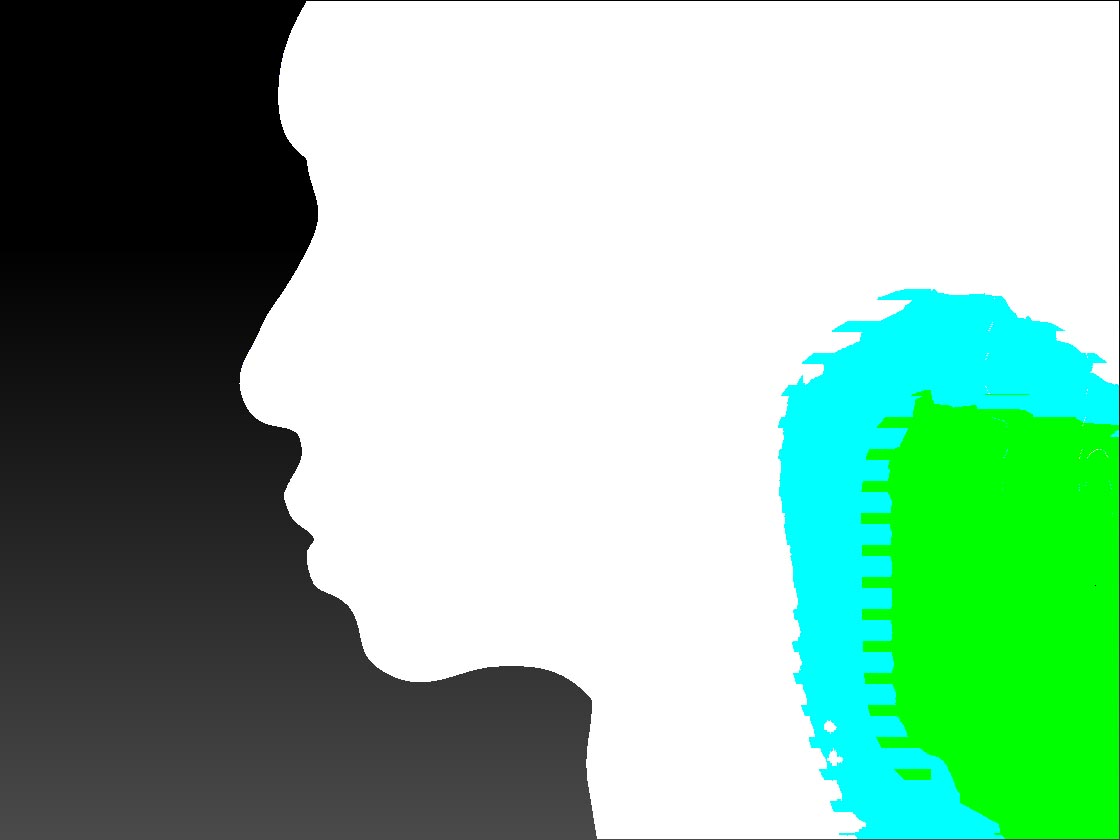
The second problem is more a user problem, when I am making something in dynamesh any thin area just keeps getting smaller and pointer as I work making the resulting mesh somewhat useless and un-sculptable.
In this case a little curl of hair. How do you keep dynamesh from doing this? is it just a mater of never making things thin?

Render Problem:

Dynamesh problem:

Thanks!
Mealea

Attachments
wtfIsThis.jpg

dynameshIssue.jpg

I think I fixed the second one sort of, I used the “Surface” slider just abovethe “Dynamesh” button. The results were ugly at high numbers but low ones, like 2 work sort of… I think…
When it is set to a positive number it sort of puffs up your mesh, full blast is like a balloon.
Negative numbers make areas of your mesh convex.

—EDIT: its not quite what I thought, you also need to boot the EDGE button but the mesh starts crinkling…

—EDIT of EDIT: Ok I was wrong, this is not working at all, but those two sliders are neat…

Hi Mealea! :slight_smile:

I have no idea what happened with your render :confused: It looks like it’s a ‘Flat’ render.

As to the other thing… If you find when your extruding your Dynamesh that it turns into that flat, sharp point at the end, use the ‘Inflat’ brush to puffen (is that a word?) it up a bit, then ‘Ctrl+click+drag’ on canvas to remesh. That will also fix it and you can carry on extruding more.

On the render thing I narrowed it down… on the 14th try naturally… why is that? its always the LAST thing you check???
Anyhow its when SoftRGB and Best are active in the render pallet and you (I) hit BPR, I tried all of them one at a time.

So…
I have no idea what this means or why its happening.
Here is the setup, no other render stuff is messed with:

Also " puffen" is a word, its also a very very god one and they are beginning to make a comeback after we nearly exterminated them.

Thanks Zber!

wow!
Inflate works very well! Everything else made it worse!

THANKS!!!

Not sure about the rendering.

As for the dynamesh trouble, give dynamesh some room to breathe. :wink: Your hair curl has very little surface geometry, making it difficult to properly map and remesh. You’ll have better results at higher Dynamesh resolutions. That said, I’m not recommending anyone start at high resolutions. Instead, simply avoid using small extrusions until a bit later in the process, when you have a higher poly count.

The “project” dynamesh button can help too, as it will attempt to accurately project original details onto the new mesh.

Also lowering the blur to zero may help. If there is no mesh smoothing (from blur) applied, the mesh might be more apt to hold it’s volume.

Last but not least, the Inflate brush is a good personal friend of mine. :slight_smile: It can help you manually correct problem geometry.

Note: There is a chance that your volume is so incredibly thin, that it’ll never work right. Inflate it up. Thin it back out after you’re done using dynamesh. Again, give it room to breathe. :wink:

hmmm thats a good bunch of stuff! Thanks!

Inflate worked very very well, everything else turned it inside out and made it even worse… The thing it self was not all that thin but it got that way while I was working on another part. I doo have blur off and I will try upping the mesh resoloution and project.

Thank you!

I find it easy just to slide the deformation inflate slider a bit before hitting dynamesh so I don’t have to switch brushes.

As to: “… why is that? its always the LAST thing you check???” I finally found my car keys the other day, but I kept on looking! :lol:

Originall posted by Nancyan:

I finally found my car keys the other day, but I kept on looking!

:lol: …Wait!..WHAT!

hehehehe!
Thats hilarious!

The dynamesh problem is mostly fixed, I still get these little points in random places but inflate kills them off nicely, smooth helps too. Thanks for that you guys!

The rendering thing is still happening, I’m curious if it happens to anyone else.

And now Im off to find my keys and the best part is I haven’t got any, this should keep me busy for a while!