Hey all!
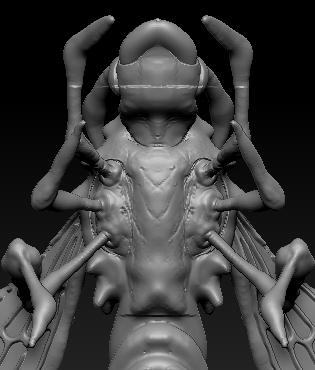
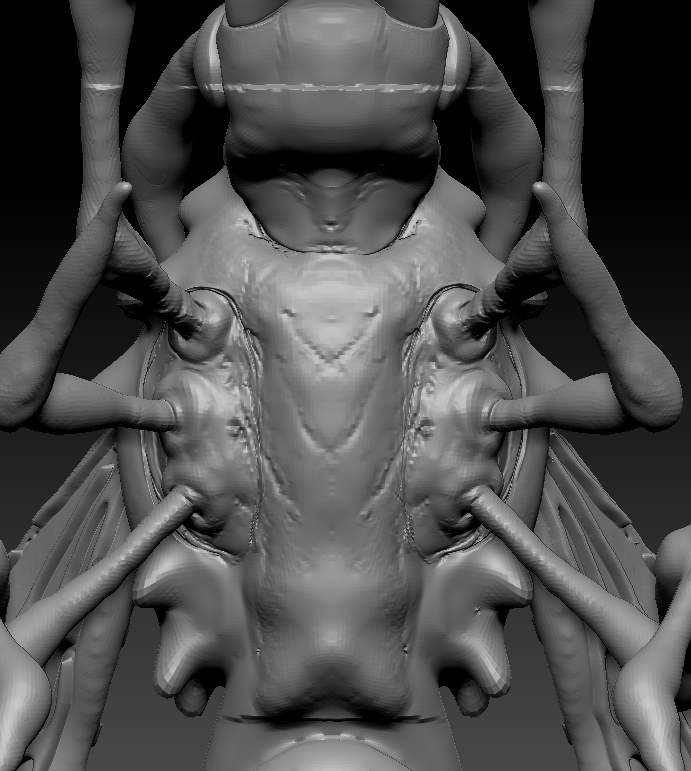
I am seeking advice regarding about this little problem that I encountered. I am using Z4R6, I am new to this and getting my hands dirty in the world of sculpting. So far I have been having a joy ride and going through the tutorials. Now I am stuck and can’t seem to find the answer to the problem. I created an alpha to use as texture on the body of the FlyingThingyStingy. However, the alpha has a edge the cuts and obscures the body of the model. In general it has an edge and I don’t know how to get rid of it. The tutorial itself doesn’t show you how. It shows you the end result of what the texture should come out. But doesn’t give you a tip or a note if or when you get in trouble in a certain area. Most of the time I could solve it, lol. But you get the jizz when you are stuck, you are stuck and it’s frustrating when you can’t solve it.
As you can see on the top by the neck and legs. You can clearly see a line cut on the body of the model that the alpha creates when you drag the alpha on the body. It also shows up at the bottom of the abdomen of the body near the end as well. What can I do to clear up this line or how can I create the texture when using the quicksketch not to have the cut when making the alpha? Any help would be great I am stuck at the moment but will continue working on it.
Attachments