ZBrushCentral

Trying to get a low polycount model from a high polycount model

I need to create UV Maps from a 3D sculpt with 10 millions of polygons but it does not have subdivision levels. This sculpture has triangles between the polygons. If I try to use UV Master it does not works as I want, because I will unwrap the model of high polycounts but not the model of low polycounts.
Maybe I will need to use the brush of “Topology” to create a new mesh. I hear suggestions and it would be great you can say me the correct steps to add low subdivision levels. Just I need to create normal and displacement map from a high quality model, but first I will need to get a model with low polycounts.
I tried to use Decimation Master but it creates triangles and overwrites my original model.

Thanks!
QRemesher is designed to make short work of this. You can even set up some control curves to try and guide the resulting topology. If you use this, work on a duplicate subtool so that you still have the original detail.

Dynamesh can also be used, at a lower resolution. Again, if you use this, do so on a duplicate subtool.

Zspheres can be used to retopologize the model, as can the topology brush that you mentioned. You can even try and combine them along with QRemesher (usually by using qremesher or the topology brush first to create larger patches, and then copying the topology over to a zsphere so that you can delete and recreate faces as needed

Thanks. I have tried with QRemesher and it works perfectly because it creates square polygons, but it overwrites my model of high polycounts. I need to create normal and displacement maps from the model of high polycounts. How could I do that?
I have done this: First I used QRemesher to get 15k polycounts in my model, then I use UV master, work on clone, and unwrap, and then I copied the UVs. Then I reload the model of high polycounts and open UV master and tried to paste UVs, but it says: Incompatible.
It would be great to know the steps to follow from the high polycount model.

You’ll want to duplicate the original subtool first, and then run QRemesher. This will give you two subtools: the original one with all the detail and your new 15k one. Run UV master on the 15k one.

Then use Tool: Subtool: Project All to start transferring the detail back from your original mesh to the new one. Subdivide, Project, Subdivide, Project, and repeat until you have enough geometry to capture all the original detail.

I have used QRemesher over the duplicated subtool and I got a 15k polycount model. The original subtool is up and the duplicated subtool is down below the original. Now where should I use “Project All”? over the 15k model or over the original subtool? is projected from the up subtool to the down subtool of this one?

Using Transpose Master I got a similar model as QRemesher.

Thanks!

Use it with the 15k mesh.

The subtool order wont matter, as long as both subtools are visible.

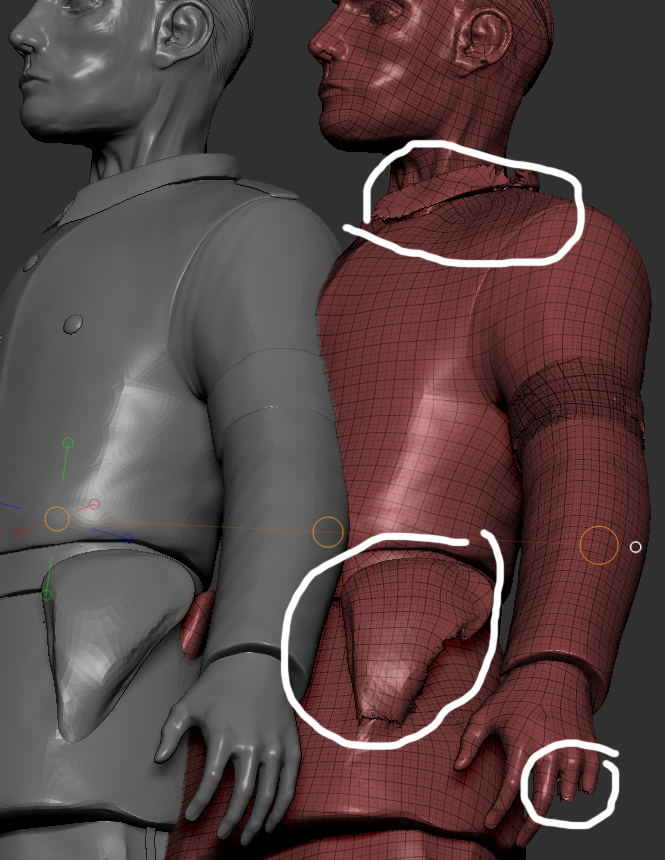
Yes, It works perfectly but the new model projected loses the detail in the fingers, buttons, as other parts. is that important? Maybe I need to work more in the curve detection and use QRemesher brush to detect curves.
Then, once I get the new model with subdivisions levels what should I do? because the new model loses some details of the original model.
Now I have two subtools.
Original model (Grey with high polycount - no subdivision levels)
Duplicated model (Red - 4 subdivision levels)

Let me understand this; is this process to reconstruct the subdivision levels of the original model and then we can delete the original model keeping the model with subdivision levels?

model 2.jpg