ZBrushCentral

Trouble with Fibermesh antialiasing

Hi all,

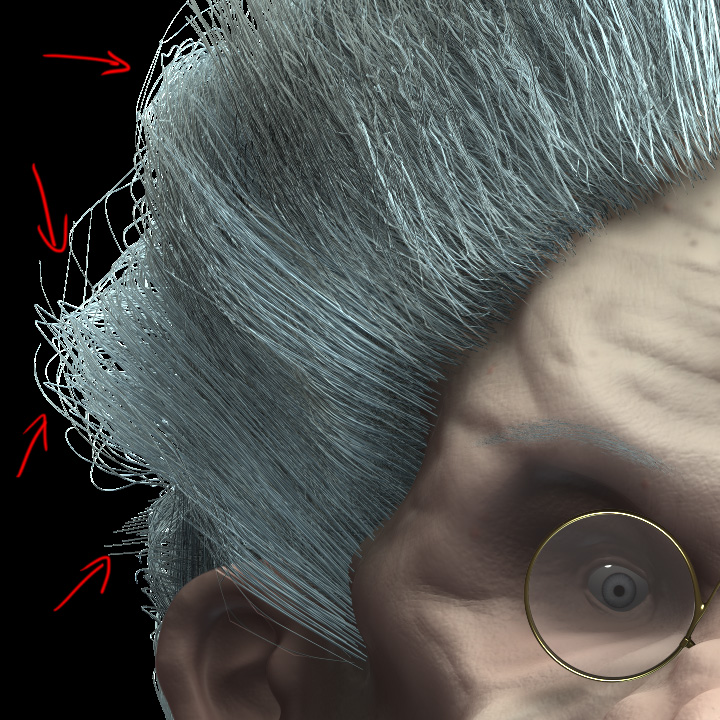
I’m having some trouble with antialiasing for the fibermesh I’m using. Somehow, everything seems to be fine for hairs that are in front of some other hairs… but it gets ugly when the hair is directly in front of the background. (see below)

I’m using BPR with a high “SPix” setting (5 to 7). The “Af” button is pressed in the render settings. Document size is rather high… at 4000px width.

Am I missing something ?

Attachments
fibermesh_aa.jpg

Is your image exported from the Render Passes menu or through the Document>Export?

From the renderpasses menu.

Oh… just tried to save the file through “Doc | Export” and anti-aliasing is just fine. That said, the “Mask” pass seems ok when saved through the Renderpasses menu, but the shadow map shows the same problem described above…

This tells us that the anti-aliasing gets calculated correctly… but somehow, when I save through the Renderpass menu, something goes wrong for some maps.

Any clues ?

Many many thanks

J.

That is intended behaviour. You need to combine the mask with the image pass and composite a background of your choice. The image pass is deliberately left without anti-aliasing at the edge of the model because otherwise you would get the background colors (from the gradient or whatever) mixed with the edge pixels. This could spoil your final image.

If you don’t need that degree of control then simply use Document>Export.

It does makes sense. Thanks for the answer…