ZBrushCentral

Trouble with custom UI - custom menus/subpalettes [Solved]

I’ve created a custom layout with menus (and sub-palettes) and hot-keys associated with the new menus.

The problem is that when I re-open zbrush, the buttons that I’ve dragged to the new menus’ sub-palettes don’t appear. The hot-keys work, the custom menus pop-up, but the sub palettes are empty!

I’ve also assigned hot-keys to default menus, and those pop up and their sub-palettes work fine.

I’ve stored config, saved ui, loaded ui - nothing seems to work. I’m not sure if they aren’t getting loaded, or they aren’t being saved/stored correctly. I’ve tried running as admin as well.

Also, switching on sub-palette pop-up, and then turning it off seems to have hidden all sub-palettes that weren’t in view. This is affecting even default menu sub-palettes as well. Now my Preferences menu only has ‘config’ sub-palette - everything else is missing (image).

any ideas?

Attachments
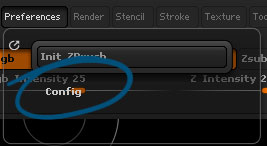
zbUI_pref.jpg

There has to be something in the scene of the correct object type. Menus are context sensitive. You may have to hold shift and click in preferences to bring up what isn’t showing. http://www.zbrushcentral.com/showthread.php?179440-interface-organisation&p=1033974&viewfull=1#post1033974

Thanks for the reply - that is normally the case, but I’ve got a tool active and none of the custom menus work

I guess the bigger issue now is the sub-palettes not re-appearing if they are not visible when you turn off sub-palette pop-up.

Even if I restore standard UI, Init Zbrush - nothing comes back to menus that were hidden when sub-palette pop-up was enabled. maybe I’ll have to re-install?

Don’t do that yet!!! Try to load a different .cfg from the upper right icons!..Read more on Custom UI first. http://docs.pixologic.com/user-guide/ Try mine if you wish, it’s on here, needs updating with more files. Ever a WIP.

Thanks again, but I tried that… I’ve loaded old cfg’s as well with no luck…

The main problem is that it is occurring in the preferences and plugins menus whether I have a tool active or not. The only sub-palette available in preferences now is ‘config’, so I can’t mess with ‘interface’ where sub-palette pop-up is located.

Feel free to make any other suggestions, tho - appreciated.

Edit: got back the preferences by opening zb4r5 and saving out the ui from there… so at least back to defaults. Not sure I want to mess with a custom ui in 4r6 again… custom menus sub-palettes don’t seem to stick…

Did you try to shift+L click on Config to see if the pallette will expand. Sounds/looks like you enabled one open sub-pallette.

Yes, tried that, no luck… thanks.

However, everything is back to normal after getting config from 4R5.

Things may have gotten messed up when I accidentally dropped a sub-palette into another sub-palette in one of the custom menu’s. I then dragged it out of that sub-palette to be at the same level as the first, but when that happened the lower block (where you put the menu items) goes missing. You can still place menu items in that sub-palette, but I don’t think its healthy when saving a config file. Also, I have no idea why the preferences sub-palettes wouldn’t come back after being in sub-palette pop-up mode, but like I said its working now…