ZBrushCentral

Trouble using ClipCenterCircle brush...I am getting jagged edges

I am again following a tutorial, learning the Clip Brushes. I had no problem using the ClipRect brush…but when trying to make a tire using the ClipCenterCricle brush I am getting artifacts on the clipped edge.

I have attached a jpeg showing the result. I turned the tire so you could see the ragged edge. When I clipped it I had it in front view. I tried it multiple times with local symmetry off and on but it not seem to make any difference.

I also am showing my settings for symmetry just in case my error is somewhere in there.

Thanks for any help.

Attachments
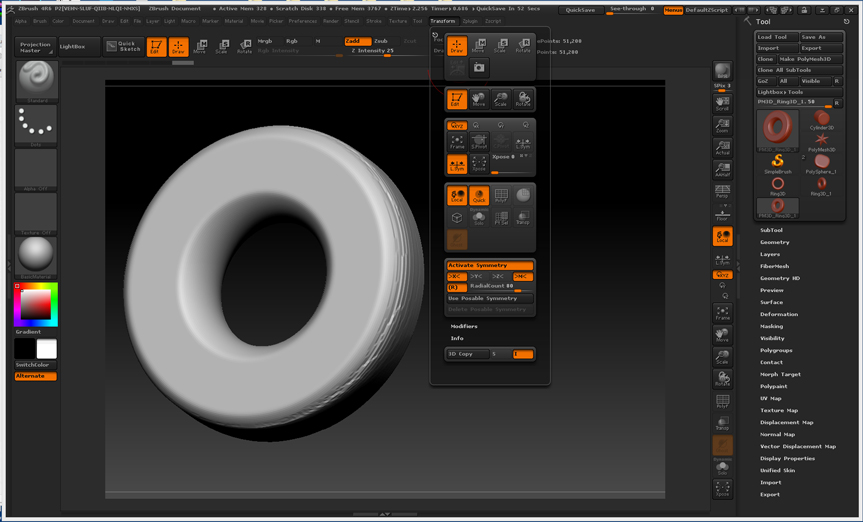
ClipCircleCenter.jpg

Try a higher mesh resolution.

Thanks for the reply Doug. I tried your suggestion. I increased the resolution and then used the ClipCenterCircle brush but I still got the jagged edges. As you can see I went all the way up to 3.6 million. I must be messing up somewhere else in the process. The examples in the book are totally clean edged.

Thanks again…

CCBDiffRes.jpg

Try a Dynamesh. As the clip brushes just compress the existing geo in one spot the results can sometimes get messy. In fact I only use the clip brushes when using a Dynamesh. hth

Thanks for the reply and suggestion dsoellbuster. I tried the dynamesh approach and it worked semi-okay. What is wierd is that when I closed out zBrush and then reopened I found the ClipCenterCircle brush worked…on the original mesh…not dynameshed.

So I started the exercise from the book all over again and again I got the artifact edges. I went ahead and saved the tool in the stage before using the ClipCenterCircle brush. Then I closed zBrush. Opened it again but it still gave the artifact. I did one undo and then used the clipCurve brush…that worked perfectly. I undid that and picked up the ClipCenterCircle brush and it too worked perfectly.

So I have no clue as to what is going on with this brush and/or my computer. But I got it to work.

Here is a shot of it.

CCBDiffRes_a.jpg