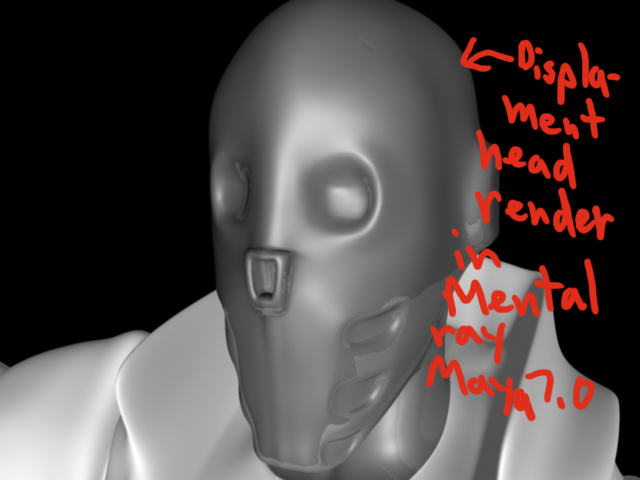
Okay, I’m trying to render multi displacements within Maya 7.0 using mental ray as well as try to combine it with my color map, bump map, and spec map.
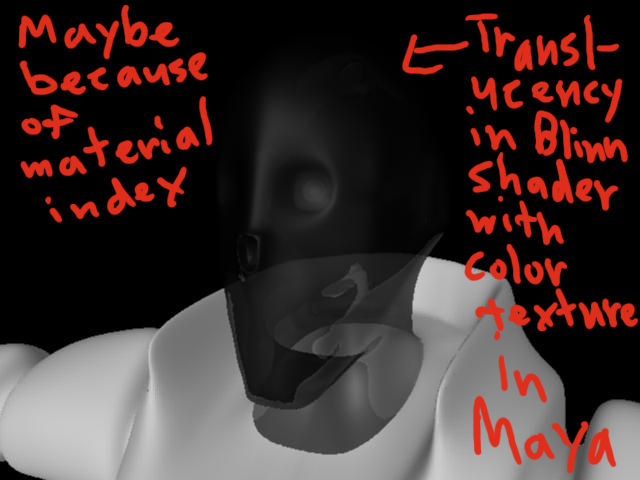
I started tweaking settings for my displacement map for the head part of my model and I thought maybe I could put in my color texture just to see what it looks like with color. So I loaded up the color texture in the same blinn shader as my 16 bit displacement map for my head and for some reason it became translucent.
The blinn material became translucent. I think it had something to do with the material index of the color texture that I exported out of Zbrush 3.1 which saved it out as a psd and then later on I saved it as a tiff in photoshop.
I guess my biggest question is how do you keep that Textured Metallic material intact along with the color in it for use in Maya rendering Mental Ray as a a color texture? Is there like a special form of shading network that I should do in order to be able to achieve this kind of look? I have provided an image of the head of what it shold look like in Zbrush but I could not duplicate in Maya. Should I do Sub Surface Scattering within mental ray instead of just using the ordinary Maya shaders?
I did all my workflow in terms of exporting multi displacement out of Zbrush 3.1 and rendering multi displacement maps in Maya according to Scott Spencer’s book. I used Maya 7.0 for all my renders. Then I get stuck with my color texture not coming out right.
Attachments